

-
Written By Adom Smith
-
Updated on March 2nd, 2026
How to Database Consistency Errors: Causes, Fixes, Solutions
Overview: IT administrators who are responsible for maintaining the email servers often face database consistency errors. Users encounter this error when SQL Server fails to follow the defined data rules properly. It may get triggered due to the abrupt shutdowns, failed transactions, or software and hardware failures. If these errors are left unresolved, they can lead to inaccurate data, application crashes, and performance issues. Therefore, this article covers various fixes to resolve this error, along with an Aryson SQL Database Recovery Solution to recover your essential data before it gets deleted.
Download Now Purchase Now
Download Now Purchase Now
What Causes SQL Database Consistency Errors?
- Sudden system crashes or improper shutdowns often trigger this error.
- Even the incomplete or failed transactions during data updates can cause this error.
- There might be hardware failures, such as disk or memory issues, behind this issue.
- Software bugs or corrupted database files may cause database inconsistency.
- The corruption of your MDF files can also cause this error.
How to resolve the Database Consistency Errors
You should have understood the cause of the issue you are experiencing after going through the above pointers. In order to overcome this error, you may use the following fixes, & if nothing works, try the automated database recovery solution for recovery.
Fix 1: Restore your Database from a Backup
You have to first restore your database from a backup, and then remove the database inconsistencies. If the database backup you have is corrupted, you can proceed with the upcoming fixes.
Fix 2: Run DBCC CHECKDB with the Minimum Repair Option
Users can also run the DBCC CHECKDB command with the minimum repair option to resolve the SQL Database Corruption and Consistency Issues. However, make sure to follow the method below accurately since the method will result in data loss.
Step 1: First, Set your Database to Single-User Mode
Make sure that you put your database in single-user mode before running the repair command.
|
ALTER DATABASE DatabaseName SET SINGLE_USER WITH ROLLBACK IMMEDIATE; |
Step 2: Execute DBCC CHECKDB with REPAIR_ALLOW_DATA
Run the DBCC CHECKDB SQL Server command using the minimum repair option.
|
DBCC CHECKDB (DatabaseName, REPAIR_ALLOW_DATA_LOSS); |
Step 3: Verification of Database Integrity
After this, you should run DBCC CHECKDB again to see that there are no consistency errors.
|
DBCC CHECKDB (DatabaseName); |
Step 4: Switch the database back to multi-user mode.
Now that the database is stable, go back to a multi-user environment.
|
ALTER DATABASE DatabaseName SET MULTI_USER; |
Fix 3: Quick Recovery Solution to resolve Database Consistency Errors
Sometimes, when an MDF file gets corrupted, the stored data, indexes, or allocation structures do not follow SQL Server’s consistency rules. In case the above solutions didn’t work for you, this might be the issue. To resolve this issue, you can use the Aryson SQL Database Recovery Tool. This software is developed to recover and restore the damaged MDF and NDF files. Moreover, it can restore everything inside them, such as tables, views, triggers, deleted entries, functions, & more. Even if you are a beginner who doesn’t possess any technical expertise to resolve this error, you can use this software. This software guides you through repairing the data & saving it either into a fresh database or as script files on your system. It also includes several other useful features that make the recovery process quicker.
Steps to Troubleshoot Database Consistency Errors
- Firstly, install the Aryson SQL Database Recovery Tool >> launch it.
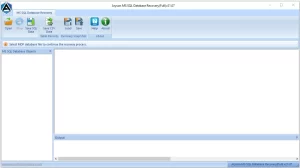
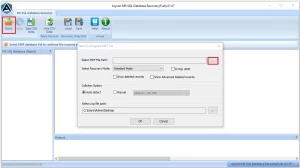
- Then, click Open & select your corrupted MDF file using the (…) into the software.
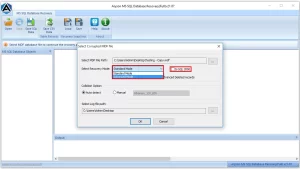
- After that, choose either Standard or Advanced recovery mode.
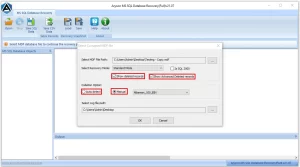
- Now, simply enable the options for deleted records & collation >> hit OK.
- Then, it will scan the file>> show results for preview >> and select the file you want to recover.
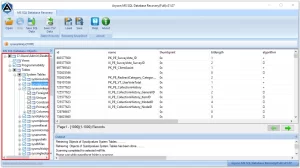
- Now, either SQL Server database or SQL Server-compatible Scripts.
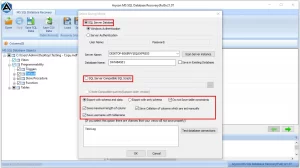
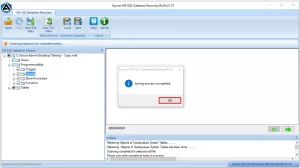
- Finally, apply any filters you prefer & click OK to fix SQL Server DBCC CHECKDB Errors.
Also Read: Understand how you can resolve the Hard Drive Error Code 0146
Conclusion
In the above write-up, we discussed various fixes to resolve the Database Consistency Errors that a user can try for troubleshooting. Firstly, you can try to restore your database from a backup or run the DBCC CHECKDB command. In case none of these work for you, you can use the above-mentioned recovery solution to recover your corrupted MDF files. Still, if you have any doubts, our tech support team is 24*7 available for you. Hope you successfully troubleshooted the error.
Frequently Asked Questions:
Q.1.How to check database consistency?
Ans- You can check database consistency by running the DBCC CHECKDB command in SQL Server, which scans the database for logical and physical corruption.
Q.2.How to maintain consistency in a database?
Ans- Database consistency can be maintained by performing regular backups, running routine integrity checks, applying updates, and ensuring proper shutdowns.
Q.3. How does DBCC CHECKDB detect consistency errors?
Ans- DBCC CHECKDB examines allocation, table structure, indexes, and page integrity to identify corruption and logical inconsistencies.
Q.4. Can database consistency errors be fixed without data loss?
Ans- Yes, using the Aryson SQL Database Recovery Software, you can fix the Database consistency & integrity errors without data loss.
About The Author:

Adom Smith is a DataRecoveryHelp Technology Writer. He is a technology enthusiast with over 3 years of experience in Data Recovery, IoT, Artificial Intelligence, and Robotics. He enjoys researching and sharing DIY solutions as well as tips and tricks for resolving Windows technical issues.
Realted Post


