

-
Written By Adom Smith
-
Updated on February 24th, 2026
Top Ways to Fix Error Code 0x80070002 Quickly
Summary: Many individuals who work with Windows often face the Windows Error Code 0x80070002. Encountering this error can be frustrating, especially when it interrupts the ongoing update or backup. These errors usually occur when some required system files are missing, corrupted, or not downloaded properly. This issue might appear to be technical, but it is generally caused due to wrong date/time settings, incomplete updates, or damaged update folders. It might seem complicated to resolve this issue, but following the right approach, you can fix it in a few seconds. Read through this blog to learn different fixes for this issue, and in case none of them work, refer to the Aryson Windows Data Recovery to recover your Windows quickly.
Download Now Purchase Now
Download Now Purchase Now
Root Causes of Outlook Error Code 0x80070002
In order to resolve the issue quickly, it is important to first know the root cause behind it. Below are some of the causes behind the 0x80070002 Outlook error code.
- Some of your required system files are missing or have been corrupted.
- There might be syncing issues appearing due to incorrect date and time.
- Your Windows Update downloads are incomplete or have failed Windows Update.
- The system drivers have become outdated or corrupted.
- Sometimes, the external devices or drives interfere with the update process.
How to Resolve the Outlook error 0x80070002?
There are different solutions to resolve the error Code 0x80070002. A few of them are listed below. Firstly, try using the manual fixes; if none of them work for you, it is advised to opt for the Aryson Windows Data Recovery Software. Make sure to follow the steps of recovery carefully in order to avoid any data loss.
Solution 1: Check your Time Settings
Even the incorrect date and time settings of your system can interrupt Windows Update. Therefore, the first fix you should try is fixing them. This solution often resolves Error 0x80070002 quickly.
- To begin, run the Control Panel on your system.
- Then, navigate to the Date and Time option.
- After that, click Change date and time >> correct if required.
- Next, set the correct time zone >> click OK.
- Now, go to the Internet Time tab >> click Change Settings.
- Then, check synchronization with an Internet time server.
- At this point, choose a server >> click the Update Now option.
- Next, press OK two times & close all windows.
- At last, restart your PC and try Windows Update again.
If the real issue of the time settings only, this solution will resolve your Windows error.
Solution 2: Delete the Corrupted System Files
If changing the time settings didn’t help you, the next step is to check for damaged files in your system.
Step 1: Scan your System for corrupted files
- Firstly, type CMD in the search panel >> select the Run as Administrator option.
- Then, you have to type SFC /scannow >> press Enter.
- The scan process will start and may take some time to finish.
Now, try updating again. If it says some files are corrupted and cannot be repaired, proceed to the next step.
Step 2: Clear Damaged Windows Update Files
- Now, open the Control Panel >> search for Administrative Tools >> open it.
- Next, simply double-click “Service” >> enter the administrator password if asked.
- Then, click the tab “Name” to sort items alphabetically >> right-click on Windows update service >> and Stop.
In case the issue is caused by the corrupted update files, clearing or resetting them can help. If it still doesn’t help, opt for the Aryson Tool to recover your Windows Data.
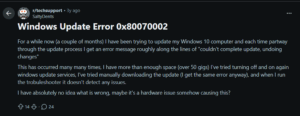
Fix 3: Use an Advanced Solution to Recover Windows Data
There might be different reasons why you are facing the Error Code 0x80070002, and users are generally not aware of the real reason behind its occurrence. In such a case, you must opt for Aryson Windows Data Recovery Software to recover your complete Windows data efficiently. This software scans your system and storage devices to detect and recover missing or corrupted files. Restoring these files helps to run the operations without any interruptions. As well as, It also supports recovery from a wide range of storage devices, including hard drives, SSDs, USB drives, memory cards, and even crashed systems. Additionally, it offers a RAW recovery mode to maximize the data retrieval. Even if you are a complete beginner, you can recover multiple files at once and restore data from damaged partitions without any data loss. You can even resolve the error 0x8000ffff using Aryson’s solutions only.
Simplified Steps to Resolve Error Code 0x80070002
- Download and open the Aryson Windows Data Recovery Software on your system.
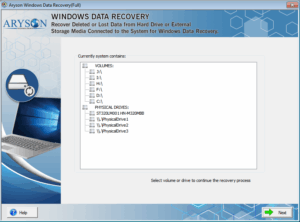
- Then, select your required drive or volume to recover data from >> click Next.
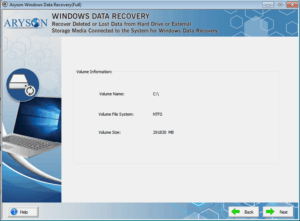
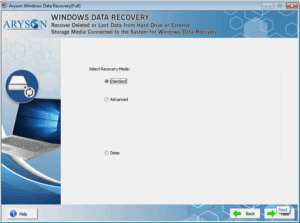
- After that, choose a recovery mode: Standard, Advanced, or Deep.
- Next, scan and select the folders or files you want to recover.
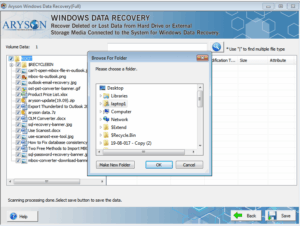
- Now, provide a location in your system to save the recovered data.
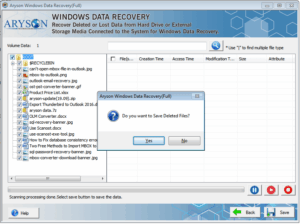
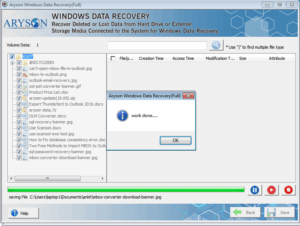
- At last, click OK to complete the recovery process & save your restored files.
Conclusion
In the above blog, we discussed various fixes to resolve the error Code 0x80070002. Firstly, check your date and time settings or remove any corrupted files in your system. In case nothing works for you, opt for the automated recovery solution above to recover your data efficiently. You may use the desired recovery mode as per the level of corruption and use the software effortlessly.
Frequently Asked Questions:
Q.1. What does “Error Code 0x80070002” mean?
Ans- Microsoft Outlook error 0x80070002 is a Windows error that occurs when required update files are missing or corrupted, preventing updates or backups.
Q.2. How can I fix 0x80070002 for Windows Update?
Ans- Correct your system’s date/time, run an SFC scan to repair corrupted files, and delete or reset the SoftwareDistribution folder.
Q.3. Is 0x80070002 related to the 0x80070003 error?
Ans- Yes, both are Windows Update errors, but 0x80070003 usually indicates a missing folder, while 0x80070002 points to missing or corrupted files.
Q.4. Can insufficient disk space trigger 0x80070002?
Ans- Yes, low disk space can prevent updates from downloading or installing, causing this error.
About The Author:

Adom Smith is a DataRecoveryHelp Technology Writer. He is a technology enthusiast with over 3 years of experience in Data Recovery, IoT, Artificial Intelligence, and Robotics. He enjoys researching and sharing DIY solutions as well as tips and tricks for resolving Windows technical issues.
Realted Post


