

-
Written By Adom Smith
-
Updated on March 2nd, 2026
Fix Outlook Error 0x80070021 Now | Step-by-Step Fix Today
Summary: Are you also facing the issue of Outlook Error 0x80070021 while sending or receiving emails? This error can disrupt your work, and are you unaware of how to fix it safely? Most of the Outlook users face this issue due to locked PST/OST files or other reasons. In this blog, we will discuss the common causes of this error and will provide a step-by-step guide to fix Outlook Error 0x80070021 in an effective manner. We will help you to restore Outlook by using Aryson Outlook PST Repair Tool in a quick and secure manner without losing any of your important emails or data. Download Now Purchase Now
Reasons Behind Outlook 0x80070021
Here are some of the common reasons that users face, and knowing these reasons will help you easily fix your issue:
- Sometimes Outlook files are being used by another program.
- Certain add-ins can interfere with Outlook’s normal work.
- Synchronization with mail servers may fail unexpectedly.
- A damaged or misconfigured Outlook profile can cause problems.
- Security software, such as antivirus or firewall, may block Outlook from accessing files.
How to Resolve Error0x80070021 Manually
When this issue keeps coming up, you can try some of the simple manual steps to resolve it. The given methods help you to stop the conflicting background processes and reduce the interference from system services.
1. Perform a Clean Boot Using the Run Dialog Box:
- First, you have to press Windows + R to open the Run dialog box.
- Then, type msconfig >> Enter.
- Open the Services tab within the System Configuration window.
- After that, check Hide all Microsoft services >> Disable all.
- Now, you need to go to the Startup tab >> Open Task Manager.
- In this, disable all startup items >> OK.
- Now, you need to restart your computer to complete the clean boot.
2. Close Outlook Running in the Background
- To start the procedure, press Ctrl + Shift + Esc to open Task Manager.
- Then, look for any Outlook.exe processes under the Processes tab.
- At last, select the processes and click End Task to fully close Outlook.
3. Disable Windows Indexing Tool to fix MS Outlook error 0x80070021
- Firstly, hit Windows + S and type “Indexing Options,” and open it.
- Then, click Modify and deselect Microsoft Outlook from indexed locations.
- At this step, click OK to save changes, and you need to restart Outlook.
Drawbacks of Fixing this Error Manually
The manual approach can fix Outlook error code 0x80070021, but it has some drawbacks that you should always keep in mind:
- This approach can take a lot of time and also need the careful attention.
- You should have some technical knowledge to follow the discussed procedure.
- This approach may not work for all versions of Outlook.
- If you follow the steps correctly, then there is a high risk of missing files.
- Also, multiple restarts and system adjustments can be a disruption to work.
Professional Approach to Fix Outlook Error 0x80070021
If you want to overcome the repeated failures and want to avoid the risk of data loss, then choosing a professional solution is the smartest move. When Outlook error 0x80070021 is linked to a corrupt PST file, using the Aryson Outlook PST Repair tool can be helpful. It securely repairs the damaged or inaccessible PST files in a quick way. Users can restore emails, contacts, and other mailbox items and maintain the original folder structure even in severe corruption. You can also fix Outlook Error 0x800ccc1a and Outlook Error 0x800ccc0f by using the same tool.
Steps to Fix 0x80070021 Error with a Professional Tool:
- To begin, download and launch the Aryson Outlook PST RepairTool.
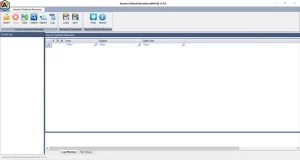
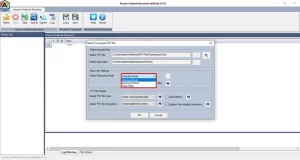
- Click on Open to add the PST file and select the recovery mode.
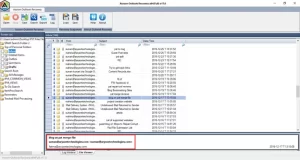
- After that, you need to preview and select the required PST file.
- Now, press the Save button to save the recovered Outlook PST files.
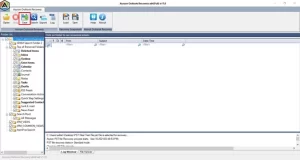
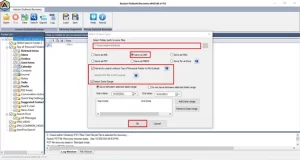
- At the end, select the saving format >> apply filters >> OK.
Conclusion
To conclude, fixing Outlook Error 0x80070021 is about selecting a solution that can save your time and protect your data. We have discussed the different approaches to fix Outlook Error 0x80070021, in which the manual approach is helpful for minor issues, but takes a lot of time. On the other hand, the professional approach can resolve the root cause and fix the issue in smooth manner. By applying the right approach, you can easily overcome the error and restore your complete access to emails without any difficulties.
Frequently Asked Question
Q.1. Why does Outlook Error 0x80070021 occur?
Ans: Outlook Error 0x80070021 usually appears when the PST file is locked or being used by another process. It can also happen due to background services, indexing conflicts, add-ins, or a damaged Outlook data file.
Q.2. How can I fix Outlook Error 0x80070021 quickly?
Ans: The quickest way to fix Outlook Error 0x80070021 is by using Aryson Outlook PST Repair tool. It repairs the corrupted PST file and restores mailbox data without manual troubleshooting. Follow the given steps:
* Download and launch the Aryson Outlook PST Repair Tool.
* Click Open to add the PST file and choose a recovery mode.
* Preview the data and select the required PST file.
* Click Save, choose the saving format, apply filters, and press OK.
Q.3. How do I repair a PST file to fix Outlook Error 0x80070021?
Ans: You can repair the PST file using the Aryson Outlook PST Repair tool, which scans and fixes corruption while preserving emails, contacts, calendars, and folder structure.
Q.4. Does restarting Windows fix Outlook Error 0x80070021?
Ans: Restarting Windows may not permanently fix the error if PST corruption exists. Professional software, such as the Aryson Outlook PST Repair tool, is recommended to resolve the issue completely and prevent it from reappearing.
About The Author:

Adom Smith is a DataRecoveryHelp Technology Writer. He is a technology enthusiast with over 3 years of experience in Data Recovery, IoT, Artificial Intelligence, and Robotics. He enjoys researching and sharing DIY solutions as well as tips and tricks for resolving Windows technical issues.
Realted Post


