

-
Written By Adom Smith
-
Updated on February 24th, 2026
Fix MS Access Error 3112 – Quick & Easy Solutions
Summary: If MS Access Error 3112 is getting displayed on your screen, there might be an issue with the permissions on the database object. Due to this error, users become unable to read records due to missing or restricted permissions. Users may still view their table data, but they can’t perform basic actions such as inserting, updating, or deleting records. Moreover, it may appear due to a corrupt MDB file. To fix this error and corrupted MDF files, read this blog and learn the use of the Aryson Access Database Recovery solution for quick recovery.
Download Now Purchase Now
Download Now Purchase Now
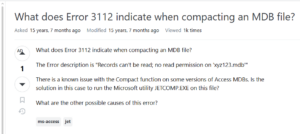
What Causes Database Error 3112?
There might be several reasons why error 3112 is appearing on your system. Check the following causes to identify the root cause and resolve the real problem.
- You might have referred to a missing or deleted table in any query.
- There might be an incorrect table or field name used in the SQL query.
- Moreover, a corrupted MS Access database (.MDB/.ACCDB) file can cause an error.
- The relationship between two or more linked tables might have been broken.
- Outdated ODBC/linked table connections can also cause issues.
How to Resolve MS Access Error 3112?
Here, in this section of the blog, we will discuss various fixes to resolve the Access Database Error code 3112. Go through the details of each method carefully and follow the steps of recovery. In case one method doesn’t work for you, move on to the next one. At the end, use automated recovery software if nothing else helps you.
Fix 1: Using the Compact and Repair In-Built Tool
The MS Access tool provides an inbuilt tool to fix the minor corruption, if any. Along with that, it also optimizes the database performance. This method is the primary one to use for resolving 3112 Error causes.
Steps to follow are:
- To begin, close the affected MS Access database if it is open.
- Run Microsoft Access and go to Database Tools.
- Post that, click Compact and Repair Database.
- In the Database to Compact From window, select the corrupted database file.
- Enter a new file name in the Compact Database Into dialog box and click OK.
- In case this procedure doesn’t work & displays an error, your database might be corrupted.
Fix 2: Transfer the Database Objects into New one
Creating a new database and importing objects from the corrupted one helps eliminate damaged components while retaining usable data and structure.
- Firstly, run the Microsoft Access app >> create a new blank database.
- Then, go to External Data and select Import.
- After that, choose the corrupted database file as the source.
- Import database objects such as tables, queries, forms, and reports sequentially.
- After importing, manually recreate table relationships.
Fix 3: Export your Tables to an ASCII File
If there is severe corruption and the above methods fail to work, you can export your tables to an ASCII file. Doing this, you can manually clean your damaged data & recover the records you need for future use.
Listed below are the steps to follow:
- Export the affected table to an ASCII (text) file.
- Delete the corrupted table and its relationships from the database.
- Now, run the Compact and Repair utility again.
- Then, recreate the table structure & relationships.
- After that, open the ASCII file in a text editor and remove invalid or corrupt entries.
- Then, import the correct ASCII file into the newly created table.
- At last, add the recovered records again into the database.
Fix 4: Recover your Corrupted MDF Files
Sometimes, corrupted MDF files are also the reason behind the Access Database Error 3112. Therefore, it is important to use reliable software to fix your MDF files so that there is no data lost. Hence, let me introduce you to the Aryson MS Access Database Recovery Software. This software is the most reliable solution to repair corrupted Access database files in a few seconds. Moreover, it maintains complete data integrity and keeps the folder structure intact during the process. Additionally, the easy-to-use interface effortlessly recovers tables, forms, modules, OLE objects, etc., without affecting the original file. Also, the user can choose between the two recovery modes provided: Standard and Advanced, as per the level of corruption. Now, follow the steps below to recover your MDF files easily without any errors.
Simplified Guide to Repairing Your Corrupted MDF Files
- To begin, install the Aryson MS Access Database Repair Tool >> launch it.
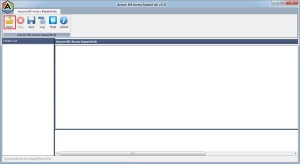
- After that, search & load your corrupted MS Access database file into the software.
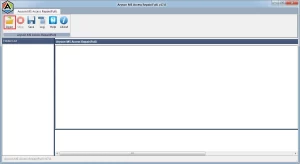
- Then, opt for a recovery mode: Standard or Advanced.
- Next, use the Auto Detect option to identify the version of the Access database.
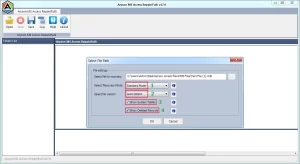
- Click OK to start scanning the database.
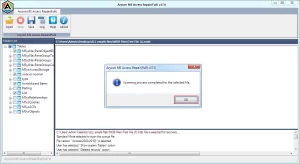
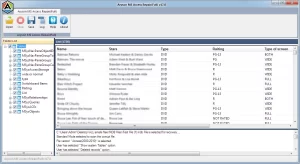
- After that, preview your recovered tables from the tree hierarchy.
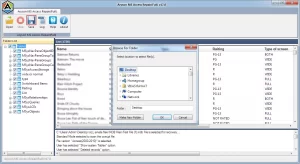
- Then, select a destination location to save your repaired files.
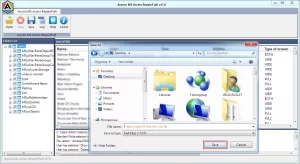
- Finally, click on the Save button to recover your MS Access database.
Read Also: Learn how to resolve the Outlook Error 500
Conclusion
In this blog, we discussed various fixes to resolve the MS Access Error 3112. You can identify the root cause behind this error appearing and then use the compact and repair tool, import your database objects, and export your tables into ASCII. But if nothing works for you, the issue might lie in your Access database file. To repair it, opt for the above automated recovery solution and resolve the issue. You may also try the demo version to get a hands-on experience.
Frequently Asked Questions:
Q.1. How do I fix MS Access Error 3112?
Ans- You can fix MS Access Error 3112 using the Aryson MS Access Database Recovery Software. Steps to follow are
1. Launch the Aryson MS Access Database Repair Tool.
2. Load the corrupted Access database file.
3. Choose Standard or Advanced recovery mode.
4. Auto-detect the Access version and start scanning.
5. Preview recovered data and select a save location.
6. Click Save to repair the database.
Q.2. Can MS Access Error 3112 cause data loss?
Ans- Yes, if you use the manual fixes, MS Access Error 3112 may cause data loss. But using the above automated software, there is no chance of data loss.
Q.3. Does MS Access Error 3112 occur in all versions of Access?
Ans- Yes, MS Access Runtime Error 3112 can occur in multiple versions of MS Access, including older and newer editions, usually due to database corruption, damaged system tables, or unexpected shutdowns.
About The Author:

Adom Smith is a DataRecoveryHelp Technology Writer. He is a technology enthusiast with over 3 years of experience in Data Recovery, IoT, Artificial Intelligence, and Robotics. He enjoys researching and sharing DIY solutions as well as tips and tricks for resolving Windows technical issues.
Realted Post


