

-
Written By Adom Smith
-
Updated on March 2nd, 2026
OneDrive Code 0x8004de40? Here’s How to Fix It
Summary: Microsoft OneDrive is a cloud service that lets you store, back up, and access your files from anywhere. The issue with OneDrive is that the users get a OneDrive Code 0x8004de40. This is an error that occurs when the OneDrive app can’t connect to the internet or the OneDrive service. It usually occurs when the user tries to sign in to their OneDrive account and is often caused by poor internet connectivity, an outdated OneDrive, or incorrect network settings. In this blog, we will learn about the error and the techniques to fix it. Before starting the fixing process, let’s understand the error.
Why does the OneDrive Error Code 0x8004de40 occur
When the error Code 0x8004de40 pops up in OneDrive, it means that the app is having difficulty with the connection to Microsoft’s cloud servers. This error mostly appears when the user tries to log in.
The problem is shown when the device is linked to a weak or unstable internet connection, network restrictions, or interference from antivirus software on your pc. To fix it, start by checking your internet settings and making sure your connection is stable.
Let’s look at the main reasons why this OneDrive sign-in error happens.
Possible Reasons for OneDrive Sign-In Error Code 0x8004de40
- Slow or Unstable Internet
OneDrive needs a good internet connection when it is at work. If the connection is weak or keeps fluctuating, it may fail to connect with the cloud.
- When Windows are not updated
When your system is not updated, OneDrive may have a problem with matching Microsoft’s latest server settings, which can cause this error.
- OneDrive Installation is Damaged
If OneDrive was not installed properly, some of its files might be missing or broken. This can stop the app from working correctly.
- Wrong Internet Settings
OneDrive uses certain internet security settings to connect. When a user sets these settings incorrectly, the app may not be able to connect and will show this error.
Proven Solutions to Resolve OneDrive 0x8004de40
If you’ve figured out the causes of this OneDrive sign-in error, it’s time to move on to the actual fixes. Below are tried-and-tested solutions to get rid of the issue.
Technique 1: Reset the OneDrive Application
If OneDrive is not functioning properly, a quick reset can often bring it back to normal. This process restores OneDrive to its default settings without affecting your stored files.
- Press Win + R to open the Run dialog on the screen.
- Paste the command and click Ok.




- When the reset is done, restart your computer.
- After restarting, again press Win + R.
- Click OK to launch OneDrive.
Technique 2: Adjust Proxy Settings
Improper proxy settings can block OneDrive’s connection. Disabling them may solve the problem.
- Press Win + R, type inetcpl.cpl, and click OK.
- In the Internet Properties window, go to the Connections tab.
- Click LAN Settings.
- Click on “Automatically detect settings.”
- Uncheck Use a proxy server for your LAN.
- Click OK to save changes, then restart your computer.
Technique 3: OneDrive 0x8004de40 Error Solved by Resetting the Windows Socket
Winsock handles network input and output requests. Resetting it can resolve hidden connection issues.
- Press Win + S, type cmd, then right-click Command Prompt and choose Run as Administrator.
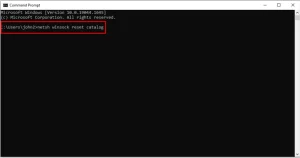
- Type the command given in the following and press Enter:
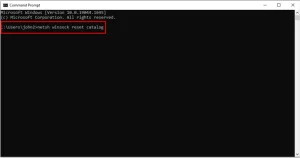
- Once the process completes, restart your PC and check if the error is continuing or not.
Technique 4: Enable TLS Protocols in Internet Settings
OneDrive requires TLS 1.0 and above to work properly. If these are disabled, connection issues may occur.
- Press Win + R, type inetcpl.cpl, and click OK.
- In the Internet Properties window, navigate to the Advanced tab.
- Scroll to the Security section and check Use TLS 1.0, Use TLS 1.1, and Use TLS 1.2.
- Click on Apply, then OK.
- Lastly, restart your computer.
Technique 5: Check the Internet Connection
When the internet is not working properly, it is one of the most common reasons for the Resolve OneDrive Code 0x8004de40.
- If you are using a wired internet connection, make sure the cable is plugged in correctly.
- For Wi-Fi, restart your router and check for speed and stability.
- Open a web browser to test your speed.
Troubleshooting: Keep Backup of Your OneDrive Data
To avoid data loss while fixing OneDrive issues, consider using the Aryson OneDrive Migration Tool. This software can be used for the safe migration of data to your device locally. which makes it better than others. It can do the migration for large data files, as it doesn’t have any limits on the data.
Conclusion
The OneDrive Code 0x8004de40 error is usually the result of simple connection or settings issues. In most cases, checking your internet, enabling the right security protocols, or resetting OneDrive is enough to get it working again. With the above-given solutions, you can quickly restore OneDrive’s connection and continue syncing your files. Keep a backup of important files so you’re protected against any unexpected issues in the future.
Frequently Asked Questions:
Q.1 What does OneDrive error code 0x8004de40 mean?
Ans. It means OneDrive cannot connect to Microsoft’s servers, usually due to network or security settings issues.
Q.2 What causes OneDrive error 0x8004de40?
Ans. Common causes include unstable internet, incorrect network settings, disabled TLS protocols, outdated Windows, or interference from antivirus software.
About The Author:

Adom Smith is a DataRecoveryHelp Technology Writer. He is a technology enthusiast with over 3 years of experience in Data Recovery, IoT, Artificial Intelligence, and Robotics. He enjoys researching and sharing DIY solutions as well as tips and tricks for resolving Windows technical issues.
Realted Post


