

-
Written By Adom Smith
-
Updated on February 28th, 2026
Fix Outlook 0x80040600 Error | Quick & Easy Solutions
Summary: Renowned for being a powerful email client, Microsoft Outlook is used by millions to send personal and professional information. However, like any software, Microsoft Outlook is not immune to errors. One of the errors that often affects users is the Outlook 0x80040600 error, which normally occurs while sending or receiving emails and can be a roadblock if it is not resolved quickly. In this post, we will tell you what causes this error, some easy fixes, and reliable solutions to get Microsoft Outlook up and running smoothly again. Using the Aryson PST recovery tool to recover the corrupted files from the Outlook servers.
What is Outlook Error Code 0x80040600?
The Outlook error code 0x80040600 usually signifies that your Outlook data file (PST) is corrupt or there is an error with the PST itself, which is typically why it does not allow you to access your mailbox and can also prevent sending and receiving emails. Sometimes it is also reported as “Outlook Receiving reported error 0x80040600” by users. In this case, Outlook cannot open or handle the data properly, causing it to perform badly.
Here are a few root reasons for this issue appearing:
- Corruption or oversized PST files.
- An unexpected shutdown of your computer or Outlook has occurred.
- Any improper installation of Outlook or improper updates.
- This is a widespread problem for Outlook 2007 due to PST file size limitations.
How to Fix Outlook 0x80040600 Error – Step By Step.
If you’re experiencing this issue, we’ve included some fast and reliable fixes.
Solution 1: Use the Built-In Inbox Repair Tool (ScanPST.exe).
Microsoft offers a free repair tool, useful for most PST troubles. The utility program is called ScanPST.exe and is designed to fix corrupted PST files within a few clicks.
- First, close Outlook, and find where the ScanPST.exe file is located (it is usually located in your Office installation folder). After you’ve located it, double-click and run ScanPST.exe.
- Upon launching the program, choose your affected PST file.
- Select Start, and the program will scan your PST file for errors and repair them.
- After your scan and repair have completed, reopen Outlook to see if your issue has been resolved.
Solution 2: Reduce the Size of Your PST File.
The sheer size of your PST file can often trigger the 0x80040600 Outlook 2007 error. If your PST file is getting pretty full, try these solutions:
- Deleting useless emails and attachments that you do not need to keep.
- Archiving old messages that you reference less often.
- Compact the PST file from Outlook settings.
- This option is available in the program.
Also, this can lead to corruption in database systems, leading to SQL Server error 5171.
Solution 3: Create a New Outlook Profile.
- When not easily identifiable, you may not always know if you’re dealing with a corrupted Outlook profile.
- In the case that you are dealing with a corrupted profile, simply create a new one.
- To do so, go to Control Panel > Mail > Show Profiles.
- Simply click Add and fill out the new profile with the necessary account details.
- Additionally, you’ll want to make the new profile the default profile to use because Outlook opens with the default profile.
Note: If you experience any failure with either of the previous methods, then you will need to use a reputable PST recovery tool as the next option.
Solution 4: Utilize Professional Outlook Repair Software to Fix Outlook 0x80040600
The Aryson PST recovery tool will help repair severely damaged PST files, recover the deleted data from your PST, and restore email data without any data loss, ensuring that these features work seamlessly together and with consistent and verifiable usability. You will get your emails restored most quickly, without more downtime than is necessary.
Easy Steps to Fix Outlook 0x80040600 Error:
- Download and install the PST recovery tool.
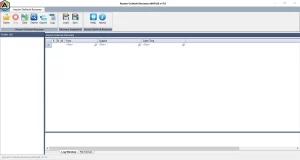
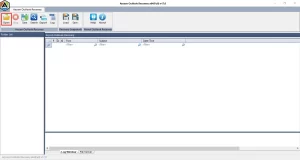
- Click on the Open option and select your corrupt PST file from your computer.
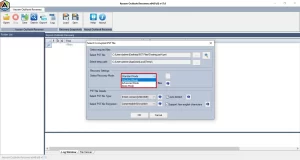
- Now, select the recovery mode – Standard, Advanced & Deep Mode.
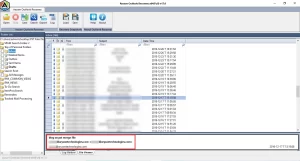
- Select the items of the PST file and preview their properties.
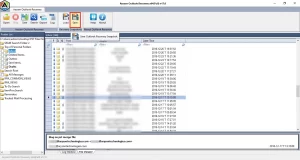
- Then, click on the Save button to save your data in a different format.
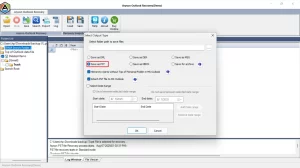
- Select the Option ‘Save as PST’ and provide the date filter if needed.
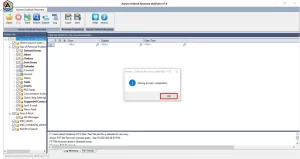
- Finally, click on OK to complete the process.
Conclusion
The Outlook 0x80040600 error can be a frustrating experience, but it is certainly remedial. Start with the appropriate basic methods for much ease and a more manageable fix (i.e, ScanPST, reduce PST size), and if those do not work for a specific instance, try to create a new profile, and if my methods prove to be negative again, then use professional repair software to restore and fix the 0x80040600 error code in Outlook. If you handle the error quickly, you will fix it and also find ways to prevent further errors specific to Outlook.
Frequently Asked Questions:
Q.1 What does Outlook Error Code 0x80040600 indicate?
Ans: It refers to an issue resulting from a corrupted, large, or inaccessible Outlook PST file, meaning you will not be able to send, receive, or open email.
Q.2 How can I resolve the Outlook 0x80040600 error?
Ans: You may be able to resolve it by repairing the PST file with ScanPST.exe, reducing the PST size, or creating a new Outlook profile. If these options do not work, your best option for resolving the problem is to use Aryson PST recovery tool, which is designed to repair Outlook.
Q.3 Why did Outlook 2007 display the 0x80040600 error?
Ans: Outlook 2007 is subject to a limited-size PST file of 20 GB. Once you exceed the size limit, you may end up with the 0x80040600 error. If the file is corrupted, you will also receive this error.
Q.4 Is the 0x80040600 error related to Outlook performance?
Ans: Yes, the 0x80040600 error is related to Outlook performance. When this error occurs, Outlook may slow down, freeze, or even crash frequently. It also prevents you from accessing your emails properly. If ignored, the error can increase the chances of data loss and make Outlook unstable. Fixing the error on time helps restore normal performance and ensures your data stays safe.
About The Author:

Adom Smith is a DataRecoveryHelp Technology Writer. He is a technology enthusiast with over 3 years of experience in Data Recovery, IoT, Artificial Intelligence, and Robotics. He enjoys researching and sharing DIY solutions as well as tips and tricks for resolving Windows technical issues.
Realted Post


