

-
Written By Adom Smith
-
Updated on March 2nd, 2026
Outlook “Cannot Expand the Folder” Error -Here’s How to Fix It
Summary: When a user’s Outlook cannot expand the Folder, they find it difficult to proceed further. Usually, it occurred when you attempted to access a public folder or shared mailbox. Suppose you’re receiving this message and aren’t sure what’s causing it or how to resolve it. You’re in the right place. To assist you in taking back control of your mailbox, this blog will explain the potential causes, obvious symptoms, and both manual and expert solutions, such as the Aryson OST Repair Tool, to help you regain control over your mailbox.Download Now Purchase Now
What Does Cannot Expand the Folder in Outlook Mean?
When Outlook is unable to open a shared, public, or Exchange account, it displays this error. Even if the folder was operating flawlessly before and nothing seemed to have changed, it frequently shows up out of the blue. When attempting to access shared folders or mailboxes via Microsoft Exchange or Office 365, many users encounter this problem. The best part is that it’s typically resolvable and doesn’t necessitate highly developed technical knowledge.
General Symptoms of the Error
You can save a great deal of time and frustration if you identify the problem early. Keep an eye out for these typical indicators:
- An error message appears when you click on a folder, but nothing else happens.
- You see notifications about problems with permissions or access.
- The OST file begins to behave strangely or appears unreliable.
- The profile settings in Outlook don’t load properly or appear to be off.
- Public folders either don’t open at all or open too slowly.
Why can’t Outlook Cannot Expand the Folder?
There are a number of major causes for this problem. Anything from bad network connections to incorrectly configured profiles can cause it. The following are a few of the more probable offenders:
- The OST file is corrupt.
- The folder is not accessible to you.
- Exchange Server malfunctions or stops syncing data.
- The account settings in Outlook are not correct.
- Exchange Mode is causing stored Sync problems.
- The OST file is either damaged or has gotten too big.
Methods to Solve “Cannot Expand the Folder” in Outlook
Now that you know what causes the issue, let us move on to how you can fix it. Thankfully, there are plenty of ways to deal with this error. Since the problem can happen for different reasons, like profile and permissions issues or damaged files, you might need to try a few methods to solve when Microsoft Outlook cannot expand the Folder. You may also encounter Outlook Error 0x80040115, which often relates to connectivity issues with the Exchange server. So, in the next part, we’ll walk you through some easy and effective solutions. Start with the basics, and if that doesn’t help, move on to the more advanced ones.
Method 1: Create a New Outlook Profile
Sometimes, users have multiple or corrupted profiles, which can cause Outlook to make errors. Here’s how to create a fresh one:
- Press Windows + R, type Control Panel, and hit Enter.
- Open the Mail (Microsoft Outlook) option.
- Click Show Profiles, then hit Remove to delete outdated ones.
- Click Add to create a new profile and set it as the default.
- Restart Outlook.
Method 2: Repair the Outlook Installation
If the issue is caused by software-level problems, repairing Outlook itself may do the trick:
- Navigate to the Control Panel and select Programs and Features.
- Find Microsoft Office, right-click it, and select Change.
- Choose Quick Repair, then click Repair.
- Follow the given instructions on the screen and restart your PC once done.
Method 3: Rebuild the OST File
If your OST file is damaged, you can recreate it manually:
- Close Outlook.
- Go to: C:\Users\[YourUsername]\AppData\Local\Microsoft\Outlook
- Locate your OST file and delete it.
- Restart Outlook—this will automatically generate a new OST.
Limitations of the manual methods:
- You might lose emails, drafts, or calendar events that haven’t synced to the server.
- These steps can be tricky if you’re not familiar with technical settings.
- Repairing Outlook only fixes basic software issues, not deeper problems like file damage.
- Setting up profiles and syncing emails again can take a lot of time.
- If the OST file is badly damaged or not linked to your email account, these methods won’t bring your data back.
Method 4: Use a Simplified Solution to Recover OST File Data
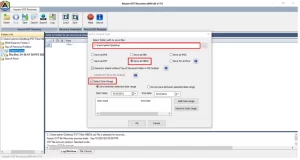
To recover data from a corrupt or inaccessible OST file, the Aryson OST Recovery Tool is a reliable choice. It quickly scans the OST file and shows a detailed preview of all mailbox items, including emails, contacts, calendars, and attachments. You can then save the recovered data in various formats like PST, EML, MBOX, and more. This tool is easy to use, requires no technical knowledge, and works with the error that Outlook cannot expand the folder.:
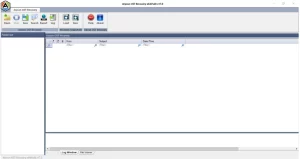
- Install and run Aryson OST Recovery Tool.
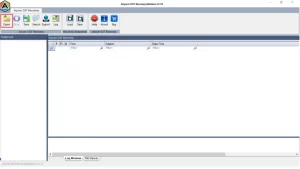
- Click Open and select the OST file you want to recover.
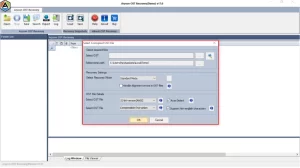
- Choose a recovery mode: Standard, Advanced, or Deep.
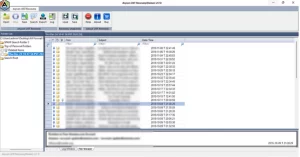
- Preview your emails and mailbox content.
- Click Save, choose a format and location, then press OK.
Conclusion
In conclusion, even though the “Outlook Cannot Expand the Folder” error might seem annoying, it can usually be resolved with the correct procedures. Start with easy fixes for permissions or profiles. Advanced techniques can assist you in regaining access and guaranteeing that Outlook continues to function without any more disruptions if the problem persists.
Frequently Asked Questions:
Q1. Why is Outlook saying cannot expand the folder?
Ans: This Outlook Error ‘Cannot Expand the Folder,’ typically means that it can’t access the folder due to permission issues, a corrupt OST file, or a misconfigured account.
Q2. What do you mean by expanding a folder in Outlook?
Ans: Expanding a folder means viewing its contents, like emails or subfolders. If Outlook can’t do this, it triggers the error.
About The Author:

Adom Smith is a DataRecoveryHelp Technology Writer. He is a technology enthusiast with over 3 years of experience in Data Recovery, IoT, Artificial Intelligence, and Robotics. He enjoys researching and sharing DIY solutions as well as tips and tricks for resolving Windows technical issues.
Realted Post


