

-
Written By Adom Smith
-
Updated on March 2nd, 2026
Outlook Error 0x8004010F: Causes and Fixes
Summary: Microsoft Outlook is one of the top email clients for millions of users worldwide; any software can have errors, and so can Outlook. Outlook consists of many common problems that can occur for both personal and business users; one of them is Outlook Error 0x8004010F. This error often pops up during Send/Receive actions. When this situation occurs, the user may find that they cannot send or receive emails until the issue is fixed. While the problem can sometimes be resolved through profile or settings adjustments, in cases where your Outlook data file is corrupted, you’ll need to repair it using the Outlook PST Repair Tool.
Download Now Purchase Now
Understanding Outlook Error 0x8004010F
This Outlook Error is primarily related to issues with your Outlook Data File, either a PST (for POP/IMAP accounts) or OST (for Exchange accounts). These files store your emails, contacts, calendars, and other mailbox data locally. If Outlook cannot locate, access, or read this file, it will stop normal mail operations.
This error can occur in:
- Microsoft Outlook 2010, 2013, 2016, 2019, and 2021
- Outlook connected to Exchange Server
- POP/IMAP accounts where the data file is mapped incorrectly
Let’s look at why the 0x8004010F Outlook Error problem occurs
- Corrupted Outlook Profile
Profiles hold configuration settings for your account. If these settings are damaged, Outlook may lose the path to the data file.
- Missing or Moved Data File
If the PST/OST file is deleted, moved to another folder, or stored on a disconnected drive, Outlook can’t find it.
- Exchange Server Issues
When the Exchange users have a broken connection or server authentication problem, it can cause the error.
- Data File Corruption
Physical damage to PST/OST files due to abrupt shutdowns, large file sizes, or malware can make them unreadable.
- Incorrect File Mapping
If Outlook is linked to the wrong data file in account settings, it won’t be able to access your mailbox.
How to Resolve Outlook Error 0x8004010F
Here are tried-and-tested methods to fix the problem. These solutions are for configuration-related causes. If your file is corrupted, refer to the repair tool section below.
Solution 1: Locate and Set the Correct Data File
- Close Outlook completely.
- Firstly, open Control Panel and navigate to Mail > Data Files.
- Link your PST or OST file to your account.
- When the file is missing:
- Similarly, click Add to create a new file.
- You can select the file location and set it as the default.
- Finally, restart your Outlook.
Solution 2 – Employ the auto account setup to add an IMAP or POP3 email account
Follow the instructions to fix Outlook Data File Error 0x8004010F:
- First, open the Start menu and go to the Control Panel.
- Next, in the Mail dialog box, go to the General tab and click Add.
- Then, in the Mail Setup – Outlook window, select Show Profiles.
- After that, in the New Profile dialog box, enter a new profile name and click OK.
- Now, in the Add Account window, provide your email account details and click Next.
- Finally, once Outlook confirms the configuration, click Finish to complete the process.
Solution 3 – Manually create an IMAP or POP3 email account
- Firstly, navigate to the Start menu and choose Control Panel.
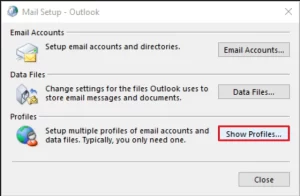
- After that, tap on Show Profiles in the Outlook dialog box.
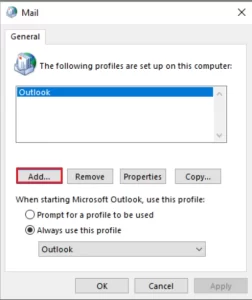
- On the General tab of the Mail dialog box, choose Add.
- Similarly, open the New Profile dialog box to enter a profile name, and click OK.
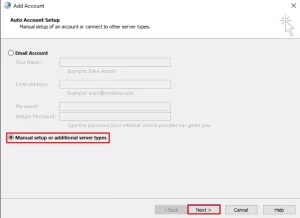
- In the Add Account window, select Manually configure server settings or additional server types, and then select Next.
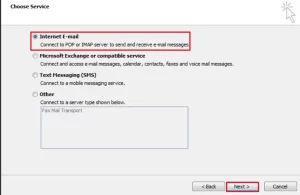
- Under Choose Service, pick Internet E-mail, and click Next.
- In the Internet E-mail Settings, enter your account information.
- Click Test Account Settings to verify the configuration.
Note: If you are unsure about the server details, contact your Internet service provider.
- Select Existing Outlook Data File, and then click Browse.
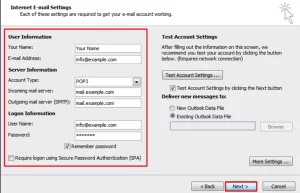
- In the Open Outlook Data File dialog box, locate and select the Outlook data file you saved earlier. Click OK, and then click Next.
- Lastly, you have to click on the close and then finish button in the Test Account Settings.
When to Use an Outlook Recovery Tool
If the above techniques don’t fix your problems and you still face Outlook Error 0x8004010F, there is a chance that the PST/OST file can be damaged. Moreover, there can be an occurrence of an error, OneDrive Code 0x8004de40, also. The Aryson Outlook PST Repair Tool will help you repair the corrupted file so Outlook can access it again.
Steps that can be followed to repair your PST file:
- Firstly, download and install the Aryson Outlook PST Repair Tool on your computer.
- Now, you can add files and folders by browsing from your local device.
- Browse and select the PST or OST file you want to add to repair.
- Choose Quick Scan for minor corruption or Advanced Scan for severe issues.
- Preview all recovered emails, contacts, and other mailbox items after the scan completes.
- You can click on Save to select PST or another file format.
Final Thoughts
In this guide, we explored several ways to resolve Outlook Error 0x8004010F. The right fix depends on the reason that is causing the problem. If the problem is related to account settings, missing file paths, or a damaged profile, the above-mentioned built-in methods can be a good solution. However, if the Outlook Data File itself is corrupted or unreadable. In that case, using automated software can be the way to restore your mailbox without losing data.
Frequently Asked Questions:
Q.1 Does error 0x8004010F affect sending or receiving emails?
Ans. Yes. This error often blocks Outlook from sending or receiving emails entirely. Until the data file or account configuration issue is resolved, your email flow will be interrupted.
Q.2 Is Outlook error 0x8004010F related to Exchange Server?
Ans. Yes. It’s commonly linked to Exchange Server when Outlook cannot connect or download the Offline Address Book (OAB) due to a corrupted profile, data file, or network issue.
About The Author:

Adom Smith is a DataRecoveryHelp Technology Writer. He is a technology enthusiast with over 3 years of experience in Data Recovery, IoT, Artificial Intelligence, and Robotics. He enjoys researching and sharing DIY solutions as well as tips and tricks for resolving Windows technical issues.
Realted Post


