

-
Written By Adom Smith
-
Updated on March 2nd, 2026
Outlook Error 0X8004011d: Causes & Solutions
Summary: Microsoft Outlook is an email client that is used by many professionals, but it is not perfect for every user. This is the general Outlook Error 0X8004011d that many users face. This error usually pops up when Outlook fails to connect to the Exchange Server. It makes it impossible for the user to send or receive emails. In addition, it sounds like a technical error, but it can be fixed simply. In this blog, we’ll discuss several solutions including Aryson PST Repair Tool, to fix it without hassle. Download Now Purchase Now
Why does This Error Occur?
- The server might be down, so Outlook can’t connect.
- Your internet could be slow or not working.
- You may have typed the wrong email or password.
- Sometimes, Outlook’s data file might be damaged.
- Lastly, antivirus or firewall settings might block Outlook.
How to Fix Outlook Error 0X8004011d: Step-by-Step
Here, we will discuss the manual and a professional tool to fix this error. The manual method does not offer a guarantee of 100% accurate recovery. Let’s explore all the methods in detail.
Method 1: Manual Method to Fix Error 0X8004011d in Outlook
- Firstly, close Outlook completely
- Then, restart your computer.
- Lastly, restart your Outlook to fix Outlook Error 0X8004011d error.
It can fix small temporary glitches.
Method 2: Check Your Internet Connection
Make sure your internet quality is good. When the internet is slow or unstable, Outlook may not connect.
Method 3: Check your Outlook credentials
Outlook might ask you to sign in again. Double-check your email and password. To repair the account manually:
- Firstly, navigate to File > Account Settings > Account Settings.
- Next, select your email account and click Repair.
- Further, follow the steps to fix the login setup.
Method 4: Create a New Outlook Profile
If your Outlook profile is corrupted, starting fresh helps.
- Firstly, close Outlook
- Navigate to the Control Panel to select Mail, then choose Show Profiles.
- Choose to use this profile as the default or let Outlook ask each time.
- Lastly, open Outlook with your new setup.
Method 5: Repair the OST File to Fix Error 0X8004011d in Outlook
Outlook saves your data in an OST file, and if that file is damaged, error 0X8004011d can show up. To fix it:
- Delete the old OST file
- Or, if you have it, use ScanOST.exe
Important Note: If nothing works, try a trusted OST repair tool to recover your data safely
Method 6: Hassle-Free Solution to Fix Outlook Error 0X8004011d
If none of the above steps work, your Outlook data file might be deeply corrupted. In such cases, a professional tool like the Aryson OST Repair Tool can help. This tool is easy to use and doesn’t need any technical skills. Furthermore, this tool offers several advanced features, such as
- Repair damaged OST files.
- Restore all emails, contacts, calendar entries, etc.
- Helps to resolve Outlook error 0x80040115 and others.
- Save the recovered data to PST and other formats.
- Work with large files without any data loss.
Simple Steps to Resolve Outlook 0X8004011d Error
- Install and run Aryson Outlook PST Recovery Tool as an administrator.
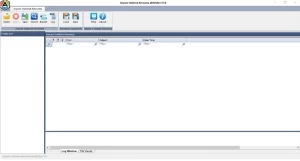
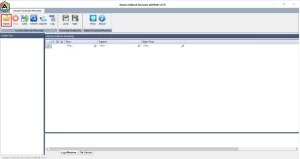
- Tap on the Open button, and a pop-up wizard will appear.
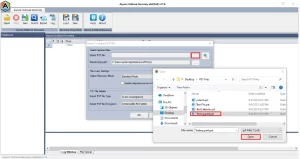
- Now, choose the PST file from which you want to recover the emails.
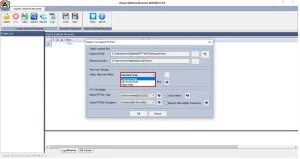
- Choose the recovery mode. (Standard, Advanced, Deep)
- After that, preview the folders in the tree structure.
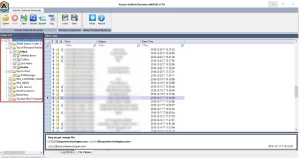
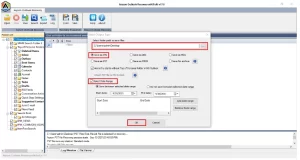
- At last, click on the Save button and select the path to save the output files. Click OK.
Conclusion
Above we had gone through the several ways to Outlook Error 0X8004011d, which can be hectic. But with the steps above, you can quickly diagnose and resolve the issue. If you are using the manual method, you might face several limitations. However, you can easily resolve this error by using a reliable repair tool to recover emails and resolve deeper file-level corruption.
Frequently Asked Questions:
Q1. When does Error 0x8004011D occur?
Ans: It occurs when Outlook can’t connect to the Exchange Server, often due to network issues, wrong settings, or a server problem.
Q2. Can it happen with Office 365 or Outlook.com?
Ans: Yes, this error can affect both if there’s a sync issue, poor internet, or incorrect mailbox setup.
About The Author:

Adom Smith is a DataRecoveryHelp Technology Writer. He is a technology enthusiast with over 3 years of experience in Data Recovery, IoT, Artificial Intelligence, and Robotics. He enjoys researching and sharing DIY solutions as well as tips and tricks for resolving Windows technical issues.
Realted Post


