

-
Written By Adom Smith
-
Updated on March 2nd, 2026
Something is wrong with one of your data files, and Outlook need to close
Summary: This blog focuses on the common Outlook error, “Something is Wrong with One of Your Data Files.” Whenever this error pops up, users can’t send or receive emails. In this detailed blog, we will look at what causes the problem and share easy ways to fix it. If you’re short on time and want a quick solution, try using the Aryson PST Recovery Tool. It can fix damaged Outlook files and recover your email data with little effort. Download Now Purchase Now
What Does This Error Mean in Outlook?
This Outlook error usually shows up when one of your data files is not working properly. These files, like PST or OST, store your emails, calendar, contacts, and other things inside Outlook. If one of them becomes damaged or stops responding, Outlook might shut down automatically.
Why does this Outlook issue generate:
- A corrupted Outlook data file
- Closing Outlook improperly
- Running an older version of Outlook
- Also, a conflict caused by third-party add-ins
Sometimes, the file can also get messed up because it’s too large or an antivirus program is interfering. When this happens, you won’t be able to send or receive emails, and Outlook may keep crashing until the problem is fixed.
How to fix Something is Wrong with One of Your Data Files and Outlook Needs to Close
Before trying any solution for the error, try one of the quickest hacks. Try restarting the system and reopening Outlook. Sometimes, errors are fixed by doing so. If not, move ahead to other solutions to remove Outlook error: Something is wrong with your data files.
Method 1: Fix Outlook Registry Keys
Sometimes, Outlook’s registry settings can get broken or go missing, which results in Outlook failing to read your data files properly and throwing this error. How can you fix the registry keys:
- Primarily, press Windows + R, type regedit, and hit Enter.
- Now, navigate to this path:
HKEY_CURRENT_USER\Software\Microsoft\Office\<your version>\ Outlook |
- In the Outlook key, find the PST or OST folder.
- Then, delete unnecessary files and data.
- Finally, close the Registry Editor and restart Outlook.
Method 2: Fix Something is Wrong with One of Your Data Files in Outlook Error
Outlook stores all your email settings in something called a “profile.” If that gets damaged, you might see Outlook errors. Making a fresh profile can fix it.
Here’s what to do:
- First, open the Control Panel on your PC.
- Now, click on Mail.
- Then click Show Profiles.
- Further, select Add, give the new profile a name, and click OK.
- Afterward, add your email account info when asked.
- After that, choose Always use this profile, and select the one you just made.
- In the end, open Outlook again.
Method 3: Fix PST Problems with the Advanced Utility
If your PST file is badly damaged or too large to open, a professional Aryson PST Recovery Tool can help. This software is designed to safely repair broken Outlook files and bring back everything like emails, contacts, calendars, and more. You can save the recovered data in different file formats like PST, EML, MBOX, MSG, and DBX. If you have similar trouble with “Outlook cannot expand the Folder”. The best part is that it is simple to use for beginners. You can try the free version before deciding to buy the full one.
Steps to Repair Outlook PST File:
- Firstly, launch the Aryson PST Recovery Tool as an administrator.
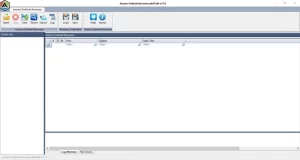
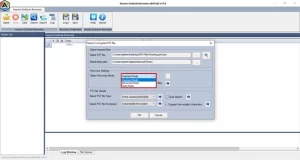
- Now, click Open to load your PST file and select a recovery mode.
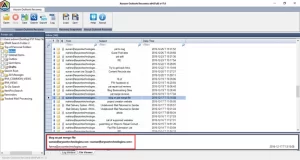
- Once scanned, preview and select the Outlook data you want to restore.
- After that, click Save to move forward.
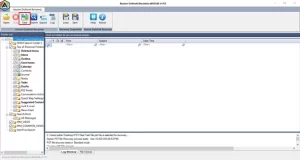
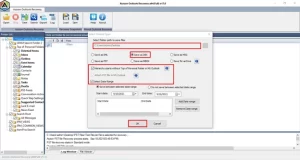
- Then, choose a file format, apply any filters if needed, and click OK to save the recovered data.
Read Also : Repair SQLite Database
Conclusion
If you’re getting the error “Something is wrong with one of your data files, and Outlook needs to close,” the main cause is usually a broken PST file. You can try fixing it with Microsoft’s ScanPST tool. But if the file is badly damaged, using a professional PST repair tool is the better option. In addition, this guide will provide you with every step you need to solve the problem.
Frequently Asked Questions:
Q1. How can I fix the error that says my Outlook data file can’t be configured?
Ans: Try creating a new Outlook profile or repairing the existing PST file using the Inbox Repair Tool (ScanPST). If that doesn’t work, you can use a professional PST recovery tool to solve the issue.
Q2. What’s the easiest way to clean up my Outlook data file?
Ans: You can remove old emails, empty the deleted items folder, and archive large folders. You can also use the built-in cleanup tools in Outlook under File > Tools > Mailbox Cleanup.
About The Author:

Adom Smith is a DataRecoveryHelp Technology Writer. He is a technology enthusiast with over 3 years of experience in Data Recovery, IoT, Artificial Intelligence, and Robotics. He enjoys researching and sharing DIY solutions as well as tips and tricks for resolving Windows technical issues.
Realted Post


