

-
Written By Adom Smith
-
Updated on March 2nd, 2026
Resolve SQL Database Error 5243: Expert Solution
User Inquiry: Hi, this is Michael Rogers from Canada. I got the following exception message when I tried to restore my SQL Server database:
“Msg 5243, Level 22, State 8, Line 1: An inconsistency was encountered during an internal operation.”
Please, can someone explain the reason for SQL database error 5243 and how to fix it without deleting my data?
“Msg 5243, Level 22, State 8, Line 1: An inconsistency was encountered during an internal operation.”
Please, can someone explain the reason for SQL database error 5243 and how to fix it without deleting my data?
Summary: There is a common issue that often occurs during the restoration or recovery of a SQL Server database is SQL Server fatal error 5243. This generally indicates that the database or backup files are damaged. This guide will cover the causes of this error and how to fix it step-by-step. The Aryson SQL Database Recovery Tool solution guarantees full data recovery without any downtime or data loss.
Download Now Purchase Now
Download Now Purchase Now
Let us understand the SQL Database Error 5243
Many SQL Server users have encountered SQL error 5243 in the course of operations such as restoring a database, recovering a server, or analyzing SQL Server logs. The full error message usually appears as follows:
Msg 5243, Level 22, State 8, Line 1
An internal operation detected an inconsistency. Contact technical support. Reference Number: %ld.
At first glance, this message doesn’t say a lot about the origin.
State 8 frequently indicates problems with password validation or authentication.
Rare but crucial, these errors can cause data inaccessibility or additional SQL database corruption if they are not fixed right away.
Common Causes for Error Code 5243 in SQL Server
A SQL database restore error 5243 can occur due to one or more of the following reasons:
- The .bak file may be damaged, or it may lack other vital information.
- The error could be caused by a bad or unreachable file path to the backup files.
- Corruption issues in SQL data files: Inconsistency occurs when the main or secondary data files are corrupted.
- Read/write failure could be due to memory issues or bad sectors on disks.
- Additionally, error 5243 can appear due to inconsistent IO operations or incorrectly assigned memory.
- This issue can occur when restoring a database that is encrypted, and the credentials are not correct.
Step-by-Step Instructions for Resolving SQL Database Error 5243
To fix Microsoft SQL Server error 5243, carefully follow the steps listed below.
Method 1: Move the Backup File to a New Location
Sometimes, the folder containing the backup file may be corrupted or inaccessible. To resolve this problem:
- Move the .bak file to a different drive or folder.
- Make sure that the SQL Server service account has read and write access to the folder.
- Attempt to restore the backup with the new path.
Method 2: Backup Files are Compatible
You will receive an error if you restore the backup file in an older version of SQL Server and the backup file was created in a newer version of SQL Server. You can see the version of SQL Server the backup file was created from using this command:
|
HEADERONLY RESTORE FROM DISK = ”; |
It will show the version of SQL Server that created the backup file in the results of your command.
Method 3: Resolve SQL Server Error Code 5243 via encryption
- Ensure that you have the corresponding certificate or asymmetric key before you start restoring an encrypted SQL database.
- Error 5243 occurs when SQL Server begins to decrypt the backup; however, SQL Server cannot decrypt because the symmetric key is not in the database or does not match the database backup encryption.
- Refer to Microsoft’s Documentation for details on managing SQL Server Certificates and Asymmetric Keys to debug encryption issues.
Method 4: Verify and Correct the Backup File Path
Sometimes, a minor path mismatch causes this error. Double-check your restore command to ensure that the backup file path is valid and accessible. For example:
|
RESTORE DATABASE MyDB FROM DISK = ‘D:\SQL_Backups\MyDB.bak’; |
Make sure the file path exists and that SQL Server has permission to access it.
Method 5: Fix SQL Error code 5243 by Backup File’s Integrity
If the backup file is corrupted, SQL Server generates an error 5243 when attempting to restore it. You can check for corruptions by executing the following statement:
|
RESTORE VERIFYONLY FROM DISK = ‘Backup_path’; |
If the file is a valid backup, you will receive a success message. If the file is invalid, you will receive a corrupt backup error.
Method 6: Repair the SQL database error 5243 with a Utility
The Aryson SQL Database Recovery Tool is reliable software to restore corrupted SQL database files. This software supports the recovery of important SQL objects such as Tables, Triggers, Indexes, Stored Procedures, and more without any data loss. It supports all SQL Server versions from 2022 and earlier and retains 100% integrity of the data every time. This software has two unique recovery modes that help manage minor as well as serious corruption, like SQL Error 3456.
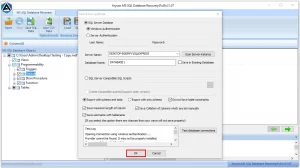
Easy Steps to fix the error 5243:
- First, launch the Aryson SQL Database Recovery Tool on your system.
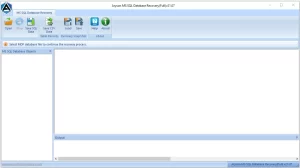
- Next, click Browse to locate and select the corrupted MDF file.
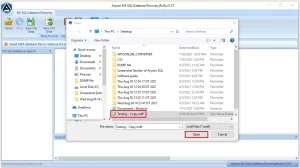
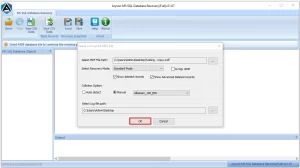
- Then, choose either Standard or Advanced recovery mode based on the corruption.
- After that, preview all the items recovered from the SQL database.
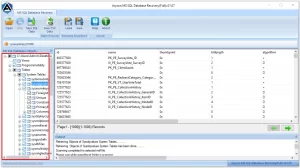
- Finally, save the recovered data to the SQL Server.
Conclusion
SQL Database Error 5243 is an issue that signals corruption within your SQL Server database. If you refuse to service it, it may continue to corrode the data, or it may cause your entire database to be unusable. So, responding quickly and correctly is critical. SQL Database Recovery Tool is a reliable and secure tool to recover the corrupted SQL database while preserving the integrity of your entire data.
Frequently Asked Questions:
Q.1 What is SQL Database Error 5243?
Ans: SQL Database Error 5243 is a fatal internal error that occurs when SQL Server detects corruption or inconsistency within a database during operations such as restoration or recovery. It usually indicates that the MDF or backup file is damaged or unreadable.
Q.2 How can I fix SQL Database Error 5243?
Ans: You can fix SQL Error 5243 by checking the backup file’s integrity, verifying file paths, and ensuring compatibility between SQL Server versions. If corruption persists, using a professional tool like Aryson SQL Database Recovery is the safest and most effective option.
Q.3 Is SQL Error 5243 related to query performance?
Ans: No, SQL Error 5243 is not linked to query performance. It stems from corruption or damage in the database files, not from slow-running queries or indexing issues.
Q.4 Does SQL Error 5243 affect both local and remote databases?
Ans: Yes, SQL Error 5243 can affect both local and remote databases if the underlying database files are corrupted or inconsistent. The location doesn’t matter—the issue lies within the data or backup file itself.
About The Author:

Adom Smith is a DataRecoveryHelp Technology Writer. He is a technology enthusiast with over 3 years of experience in Data Recovery, IoT, Artificial Intelligence, and Robotics. He enjoys researching and sharing DIY solutions as well as tips and tricks for resolving Windows technical issues.
Realted Post


