

-
Written By Adom Smith
-
Updated on February 20th, 2026
SQL Database Error 601: Step-by-Step Guide
Summary: Do you face SQL Database Error 601 when you execute a query in SQL Server? This error appeared due to the internal data issues, which can stop SQL Server from reading records correctly. As a result, most of the users may lose access to their important data. To fix such issues, we will cover the most reliable approaches, which include SQL Database Recovery Software for easy repair.
Download Now Purchase Now
Download Now Purchase Now
What Is SQL Server Error 601 NOLOCK?
The error of SQL Server happens when the database cannot access certain data pages due to corruption. When you use the NOLOCK hint on damaged tables, this can trigger this error, which can fail your queries or provide incomplete results. Therefore, identifying the cause is much more important before you apply any repair solution.
Reasons for SQL Error Code 601
Now, we will discuss the main causes behind this error and why it appears in your database:
- Database pages can get corrupted and prevent proper access.
- Subsequently, hardware problems can damage database files.
- When there are unexpected shutdowns, it can affect database integrity.
- Moreover, viruses or malware can harm SQL database data.
- Also, very large databases may face consistency issues that trigger the error.
Proven Solutions for SQL Database Error 601
In this section, we will cover the two best approaches that resolve this error. Users can opt for the approach according to their requirements and level of technical knowledge.
- Manual Approach
- Professional Solution
Way 01: Manual Solution to Fix SQL Error 601
The manual approach can be used when you have minor database corruption or small SQL files. You can use the built-in SQL Server commands and management tool in order to repair the database. Although it is cost-free yet you need some technical knowledge to avoid any further issues.
Steps to fix error 601 in SQL Server database manually:
- Firstly, start SQL Server Management Studio and access the database that has the issue.
- After that, you can run the given command to check the database for corruption.
- Then, if errors appear, you can use the given command to fix them.
- Now, you have to set the database to single-user mode before applying repairs.
- Afterward, you have to take a full backup of the database before making changes.
- Then, you can apply the repair command in order to restore database integrity.
- Next, after the process of repair, you have to switch the database back to multi-user mode.
- Now, you have to run DBCC CHECKDB again to confirm the database is clean.
- At last, you have to test queries to make sure that the database works properly.
| DBCC CHECKDB (‘YourDatabaseName’) WITH NO_INFOMSGS, ALL_ERRORMSGS; |
| ALTER DATABASE YourDatabaseName SET SINGLE_USER WITH ROLLBACK IMMEDIATE;
DBCC CHECKDB (‘YourDatabaseName’, REPAIR_ALLOW_DATA_LOSS); ALTER DATABASE YourDatabaseName SET MULTI_USER; |
Shortcomings of the Manual Method
- This method only works for small or lightly corrupted databases.
- The procedure may take extra time and needs careful handling.
- Users need technical knowledge of SQL Server commands and settings.
- There is a risk of accidental data loss if backups are not taken properly.
- Moreover, it may not fix severe corruption or large-scale database errors.
- Also, this may be difficult for beginners to handle troubleshooting errors.
Way 02: Automated Approach to fix SQL Database Error 601
SQL Database Recovery Software is a dependable solution that restores corrupted SQL Server database files with ease. It helps you to fix both minor & major corruption problems in MDF and NDF files, which allows users to recover important database objects. Users can use the tool without any complicated technical skills, which makes the recovery process simple and reliable. Users who face SQL Server Data Compression can fix the issue with the help of the same utility.
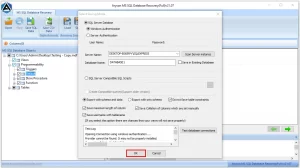
Quick Guide to fix Microsoft SQL Server error 601:
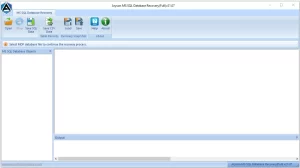
- First, you have to install the SQL Database Recovery Software >> Open.
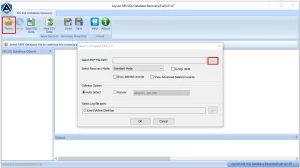
- After that, add the corrupted SQL database file that you want to repair.
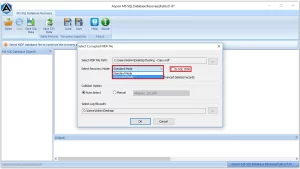
- Then, choose the suitable recovery mode to start scanning the database.
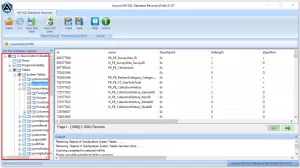
- Now, once the scan is complete, you have to review the recovered tables.
- At last, save the recovered data to a live SQL Server or as an SQL script file.
End Note
In this blog, we have covered different ways to fix SQL Database Error 601. While the manual method can work for minor cases yet it has certain risks and requires technical knowledge. For severe corruption, an automated solution is a more reliable choice. So, decide on the suitable technique to correct the database error and restore your files. If you face any problems or need guidance, you can contact our support team for help.
Frequently Asked Question
Q.1 Is SQL Error 601 related to data corruption?
Ans: Yes, it usually appears when SQL Server cannot read data properly due to internal issues. In such cases, a professional recovery tool can help repair the corrupted database files safely.
Q.2. Is SQL Error 601 a runtime error?
Ans: SQL Error 601 may appear during query execution, and it indicates that SQL Server is unable to access certain data pages correctly.
Q.3. Can NOLOCK queries trigger Error 601?
Ans: Yes, in some situations, using the NOLOCK hint on corrupted tables can lead to Error 601. If the database has structural issues, NOLOCK queries may expose those problems and cause the error to appear.
About The Author:

Adom Smith is a DataRecoveryHelp Technology Writer. He is a technology enthusiast with over 3 years of experience in Data Recovery, IoT, Artificial Intelligence, and Robotics. He enjoys researching and sharing DIY solutions as well as tips and tricks for resolving Windows technical issues.
Realted Post


