

-
Written By Adom Smith
-
Updated on March 2nd, 2026
How to Fix SQL Error 8942 Quickly with Our Step-by-Step Guide
Summary: SQL Server is one of the most dependable tools to manage large volumes of structured data. It is utilized by numerous organizations to manage important business data, including employee records, transactions, and internal databases. If you are a user of SQL Server, you might encounter SQL Error 8942, which is an error that can suspend utilization and put your data integrity at risk.
If you have been presented with this error and do not know where to begin, this guide is for you. We will describe what causes this issue and the use of the Aryson SQL Database Recovery Tool to fix SQL Server Error 8942 quickly.
Download Now Purchase Now
If you have been presented with this error and do not know where to begin, this guide is for you. We will describe what causes this issue and the use of the Aryson SQL Database Recovery Tool to fix SQL Server Error 8942 quickly.
Download Now Purchase Now
Do You Know What SQL Error 8942 Means?
For most end users, SQL Error 8942 is not an error message that they are familiar with. This issue pertains to errors in the SQL Server tables and will often develop due to damaged or misplaced table structures or record pointers within the database. Typically, you will receive the following error message:
SQL Error 8942: Table error: Object ID, Index ID, Page ID, Slot ID. The record ID (RID) on the page is incorrect.
It indicates that there is corruption in the table or index pages, and SQL Server is not capable of reading or writing data correctly.
Main Causes of SQL Database Error 8942
There are many reasons you can see this error. Here are the most common:
- Incorrect Offset Values: If the offset of a slot ID is not equal to or greater than the previous slot ID’s offset, then the SQL Error Code 8942 is thrown.
- Hardware Problems: Disks, controllers, and memory can cause SQL database tables to become corrupted in the event of hardware issues.
- Forced Shutdowns: If you stop the SQL Server while a process is running, you can leave database tables either incomplete or corrupted.
- Lack of Completeness to a Backup or Restore: Outdated or bad versions of backup files can also invoke this error.
Whatever the concern may be, you should correct SQL Server Error 8942 Code as soon as possible to avoid data loss and poor performance.
Efficient Ways to Fix SQL Error 8942
If you’d rather fix this error yourself, you have other options to try first; there are ways to try to fix the error before contacting software support:
1. Restore from Backup to Fix Microsoft SQL Server error 8942 code
The simplest and safest solution is restoring from backup. If your backup is relatively current and trustworthy, restoring from backup is preferred.
- Open SQL Server Management Studio (SSMS).
- Go to Databases → Restore Database.
- Select your backup file and click OK to restore it.
Note: If your backup is old or unavailable, proceed to the next method.
Method 2. Examine Hardware Issues
Hardware failure can frequently lead to corrupted pages. Look for errors by:
- Checking the SQL Server error logs and Windows Event Viewer, also check for any warnings related to disks or memory.
- If the hardware went bad, then correct the hardware issue first before attempting to repair the database.
- Correcting hardware issues early may help you to reduce further corruption and will stabilize your database.
Method 3. Run the DBCC CHECKDB Command To Fix Troubleshooting SQL error 8942
The implementation of the DBCC CHECKDB command is used for the examination and repair of SQL Database Consistency. Follow the sequence of steps:
Execute the command:
| DBCC CHECKDB (‘Database_Name’); |
In the results returned, review the Index ID value.
If Index ID > 1, drop and recreate the index.
If Index ID = 0 or 1, rerun the DBCC CHECKDB command, but this time use the repair options.
In regard to repair options, you can use one of the following commands depending on the applicable situation: command is used to check and repair SQL database consistency. Follow these steps:
Run the command on the corrupted database: Check the Index ID value in the result.
| DBCC CHECKDB (‘Database_Name’, REPAIR_FAST);
DBCC CHECKDB (‘Database_Name’, REPAIR_REBUILD); DBCC CHECKDB (‘Database_Name’, REPAIR_ALLOW_DATA_LOSS); |
- If Index ID > 1, drop and recreate the index.
- If Index ID = 0 or 1, re-run the DBCC CHECKDB command with repair options.
You can use one of these repair options depending on the situation:Caution: It is always best practice to take a backup before using repair methods, especially REPAIR_ALLOW_DATA_LOSS, which can delete bad but unreadable data. If this doesn’t work, the corruption is likely too bad, and you will need a professional.
Method 4: SQL Database Recovery Tool
The Aryson SQL Database Recovery Tool is designed to correct SQL Error 8942 and repair all forms of database corruption with no risk of losing data. It effectively recovers tables, triggers, rules, stored procedures, and all other elements of your database. It can also easily repair severely damaged MDF and NDF files. This utility can also fix SQL database error 5243 and others.
Steps to Fix SQL Error 8942 Using SQL Database Recovery Tool
- Firstly, install the SQL Database Recovery Tool on your system.
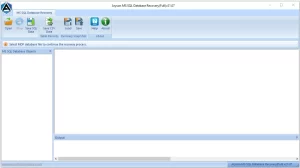
- Next, browse the corrupted MDF file. Click OK to proceed.
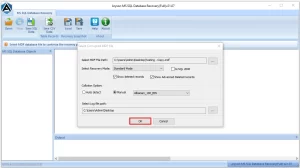
- The tool will scan the database files. Once the scanning completes, a confirmation message will appear. Click OK.
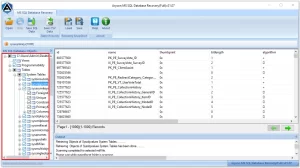
- After scanning, all the recoverable SQL databases will be displayed in a tree-structured format.
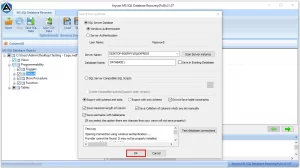
- Select the items you wish to save and click on Save.
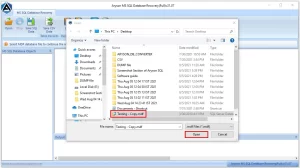
- Choose the saving mode, either SQL Server Database or SQL Server Compatible SQL Scripts.
Wrapping Up
Resolving SQL Error 8942 can be labor-intensive, especially if you lack a current backup or any technical competence. There are some manual options to try, including hardware checks or the DBCC CHECKDB command, or restoring from a backup. But when you want better, faster recovery without the loss of data, the safest option is a professional SQL Database Recovery Tool.
Frequently Asked Questions:
Q.1 What is SQL Error 8942?
Ans: It’s a table-related corruption error in SQL Server that indicates inconsistencies in record pointers or damaged database pages.
Q.2 How can I fix SQL Error 8942?
Ans: You can restore from a backup, inspect hardware issues, run the DBCC CHECKDB command, or use the Aryson SQL Database Recovery Tool for complete repair.
Q.3 Can SQL Error 8942 impact SQL Server performance?
Ans: Yes. It can slow query execution, cause failed reads, and even make the database inaccessible if not fixed quickly. Manual conversion can still be time-consuming, may cause data mismatches, and could disturb the existing folder structure or attachments.
About The Author:

Adom Smith is a DataRecoveryHelp Technology Writer. He is a technology enthusiast with over 3 years of experience in Data Recovery, IoT, Artificial Intelligence, and Robotics. He enjoys researching and sharing DIY solutions as well as tips and tricks for resolving Windows technical issues.
Realted Post


