-
Written By Adom Smith
-
Updated on March 5th, 2026
Fix SQL Server Error 40 – Complete step-by-step full guide
Summary: When you try to connect to your database, and suddenly SQL Server shows “Error 40: Could not open a connection to SQL Server”. This means that your application cannot access data, reports stop loading, and your work gets delayed. If not fixed quickly, it can slow down your entire workflow. In this blog, we will cover the effective approaches to resolve SQL Server Error 40. In addition, we will introduce the MS SQL Recovery Tool to handle your database-related issues.
Download Now Purchase Now
Download Now Purchase Now
Reasons to Fix SQL Server Error 40
Before you apply any solution, it is essential to understand why this error occurs. Identifying the root cause helps you to fix the problem faster and avoid it in the future.
- SQL Server services may not be running on the host machine.
- There is an incorrect server name or instance name in the connection string.
- Subsequently, firewall settings can block the SQL Server port.
- Moreover, the SQL Browser service may not run for named instances.
- The TCP/IP protocol is disabled in the SQL Server Configuration Manager.
Proven Solutions to Handle SQL Server Error 40
Now that the source of the problem is clear, we will explore the available approaches to fix it. You can select the approach that best matches your server condition.
- Manual Approach
- Automated Approach
Solution 01: Manual Approach to Resolve Error 40
This issue usually appears when the client system fails to establish communication with the database server. In most of the situations, simple configuration or network-related issues are responsible for this problem.
Steps to Resolve Server Error 40 :
- First, you have to open SQL Server Configuration Manager and confirm that the SQL Server service is running. Start it if it is stopped.
- After that, you can double-check the server and instance name in your connection settings to make sure that they are correct.
- Then, you have to enable TCP/IP under SQL Server Network Configuration and restart the service.
- Now, you need to make sure that the SQL Server Browser service is active if you are using a named instance.
- Afterwards, you have to check your firewall settings and allow the default SQL Server port 1433 if it is blocked.
- Next, in SQL Server properties, you have to confirm that remote connections are allowed.
- At the end, you can test the connection again to see if the error is cleared.
Limitations of the Manual Approach
- It requires technical knowledge of SQL Server settings and services.
- Your small mistake in configuration can create new connection problems.
- Moreover, it does not help if your database files are corrupted.
- Subsequently, your repeated trial and error can delay business operations.
- Also, network-related issues may still remain unresolved after basic checks.
Solution 02: Automated Approach to Fix SQL Error 40
MS SQL Recovery Tool is the most recommended utility that helps to repair damaged SQL database files when connection issues are caused by corruption. If SQL Server Error 40 occurs due to faulty MDF files, this tool allows you to recover database objects and restore access without any modification in the original data. With the help of the same utility, users can easily fix the MySQL error 1064.
Steps to fix Error 40 in SQL Server:
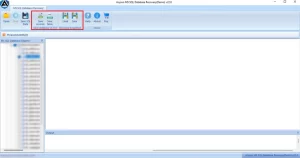
- Firstly, install and launch the MS SQL Recovery Tool on your system.
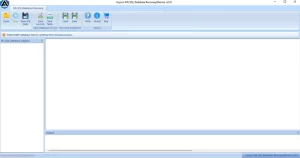
- After that, you have to click Open to add the damaged SQL database file.
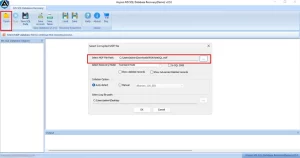
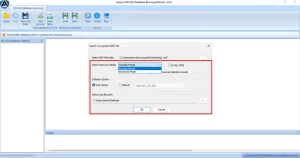
- Next, you need to select the suitable recovery mode and continue.
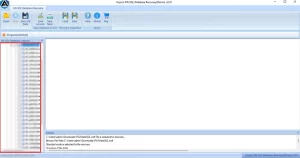
- Now, review the recovered data and choose what you want to restore.
- At last, click Save and select the desired saving option to finish the process.
End Note
In this blog, we have discussed how SQL Server Error 40 can interrupt your work, but it is usually manageable when you handle it correctly. In most of the cases, you can check services and connection settings to resolve this issue. However, if the problem is linked to database corruption, manual fixes may not be enough. In such cases, you can pick a reliable recovery tool, which is a safer option. You can follow the right approach to restore the connection and keep your SQL database running without any disruption.
Frequently Asked Question
Q. How to enable TCP/IP protocol to fix Error 40 in SQL Server?
Ans: Follow these steps to enable TCP/IP.
1. Open SQL Server Configuration Manager.
2. Go to SQL Server Network Configuration and select your instance.
3. Right-click TCP/IP and click Enable.
4. Restart the SQL Server service.
5. Test the connection again.
Q. How to Resolve Server Error 40 on a remote server connection?
Ans: Use the steps below to fix the issue on a remote server.
1. Confirm the SQL Server service is running.
2. Check the correct server and instance name.
3. Enable remote connections in server properties.
4. Allow port 1433 in the firewall settings.
5. Start the SQL Server Browser service if needed.
If corruption causes the issue, repair the database file using a trusted SQL recovery tool.
About The Author:

Adom Smith is a DataRecoveryHelp Technology Writer. He is a technology enthusiast with over 3 years of experience in Data Recovery, IoT, Artificial Intelligence, and Robotics. He enjoys researching and sharing DIY solutions as well as tips and tricks for resolving Windows technical issues.
Realted Post