

-
Written By Adom Smith
-
Updated on February 28th, 2026
How to solve SQL Server Error Code 50000 Step-by-Step guide
User Query: While executing a stored procedure on my database, I keep receiving SQL Server Error Code 50000. How can I gradually resolve this problem without losing anything?
Summary: Error 50000 in SQL Server is a custom error message. It usually occurs when a stored procedure, trigger, or T-SQL code uses RAISERROR or THROW. This error is not a system bug but rather a user-defined message set by the database developer. In this guide, we will explain why this error occurs and how you can fix it. Also, you can use Aryson SQL Backup Recovery tool to recover corrupted or damaged databases.
Download Now Purchase Now
Download Now Purchase Now
What is SQL Server Error Code 50000?
Error Code 50000 is a custom-defined error in SQL Server. It is activated when a function, stored procedure, or trigger is made to return a certain error message.
A developer may use, for instance: RaiseRROR(‘Invalid Input Detected’, 16, 1); This would return error code 50000 along with the message “Invalid Input Detected.”
Common Causes of SQL Error 50000
The following are some typical causes for this error:
- The entered data does not satisfy the necessary requirements.
- The procedure blocks invalid operations.
- The developer intentionally raised the error.
- Additionally, an action like INSERT or UPDATE is being rejected by the database.
Manual Methods to Fix SQL Server Error Code 50000
The steps below can be used to manually fix SQL Error 50000:
Step 1: Find the Source of the Error
- Firstly, determine which function is causing the error.
- Next, identify the source of the error using Extended Events or SQL Profiler.
Step 2: Review the Stored Procedure or Trigger
- Then, open the procedure in SQL Server Management Studio (SSMS).
- After that, search for RAISERROR or THROW.
- Understand by reading the message and why it is triggered.
Step 3: Validate Input Data to Fix SQL Backup Failed Error 50000
- Now, check the values you are passing to the procedure.
- Next, ensure they match the data type, range, and format required by the procedure.
Step 4: Check Database Triggers to Fix Error SQL 50000
- Afterward, run the following query to list triggers:
- SELECT * FROM sys. triggers;
- Further, disable the trigger temporarily and re-run the transaction (if allowed).
Step 5: Verify User Permissions
- Now, make sure the user account has the required rights to execute the procedure.
- Finally, grant missing permissions if needed. Example:
GRANT EXECUTE ON [ProcedureName] TO [UserName];
Note: When SQL Server error 50000 backup failed troubleshooting steps will help you to fix the SQL 5000 error and get your data back.
Professional Tool to Repair Corrupt/Damaged SQL File
If your SQL database file is severely corrupted, there might be a chance of SQL Server Error Code 50000. To recover a corrupted SQL database file, you can use the
Aryson SQL Backup Recovery. This tool is the best solution that gives you 100% accurate recovery with a guarantee of no data loss. It maintains the original data confidentiality, integrity, and accessibility during the recovery. Moreover, it also helps to recover other errors, like SQL Server Error 926 and more.
Steps to Recover Corrupted SQL File:
- Initially, download and install the Aryson SQL Backup Recovery on your PC.
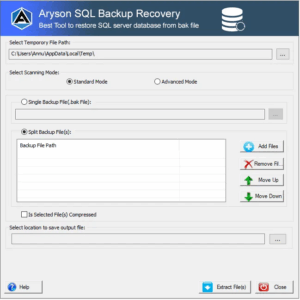
- Now, click on Open to add a corrupted or damaged SQL database file.
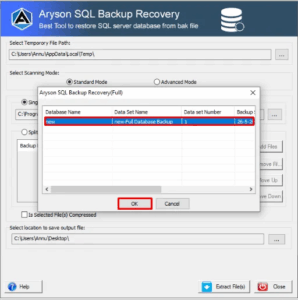
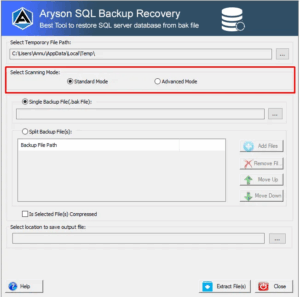
- Then, choose Recovery Mode and other advanced options. Click OK.
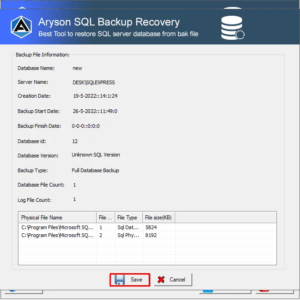
- After that, you can preview all the recovered SQL database files.
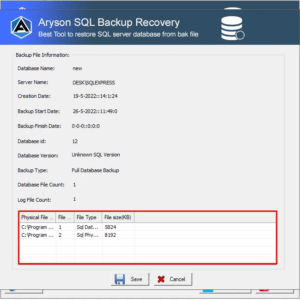
- Lastly, click Save and choose a different Saving Format as per your needs.
Why Choose a Professional MS SQL Recovery Tool?
- Recovers damaged MDF and NDF files.
- Restores deleted records, triggers, stored procedures, and indexes.
- Compatible with all versions of SQL Server.
- Furthermore, it saves time and prevents manual errors during recovery.
Conclusion
In this technical blog post, we have explored some of the several methods to resolve SQL Server Error Code 50000. This error is user-defined and not a system-level bug. You can fix it by using the manual methods. If the database is corrupted, using an MS SQL Recovery Tool is the safest solution. Furthermore, download the demo version of this tool to understand its features and performance. You can only preview the recovered file with the demo version. To save it, there is a need to upgrade to the full version.
Frequently Asked Questions:
Q.1 What is SQL Error 50000?
Ans: SQL Error 50000 is a user-defined error in SQL Server. It usually appears when developers or database administrators use the RAISERROR or THROW statement to return a custom error message. Since it’s not a system error, its meaning depends on how it is defined in the code or stored procedure.
Q.2 How do I handle SQL Error 50000 natively in SQL Server?
Ans: You can handle SQL Error 50000 using TRY…CATCH blocks. This allows you to capture the error, log it, or provide alternative logic when it occurs. For example:
|
BEGIN TRY [SQL code Here] END TRY BEGIN CATCH PRINT ‘Error Number: ‘ + CAST(ERROR_NUMBER() AS VARCHAR); PRINT ‘Error Message: ‘ + ERROR_MESSAGE(); END CATCH; |
This helps in controlling execution flow without unexpected interruptions.
Q.3 Is SQL Error 50000 specific to a version of SQL Server?Ans: No, SQL Error 50000 is not tied to any specific SQL Server version. It is a custom-defined error code available across all SQL Server editions and versions that support the RAISERROR and THROW statements.
About The Author:

Adom Smith is a DataRecoveryHelp Technology Writer. He is a technology enthusiast with over 3 years of experience in Data Recovery, IoT, Artificial Intelligence, and Robotics. He enjoys researching and sharing DIY solutions as well as tips and tricks for resolving Windows technical issues.
Realted Post


