

-
Written By Adom Smith
-
Updated on March 2nd, 2026
How to Fix Error Code 0142 on Dell PCs | Quick Solutions
Overview :In today’s world, the use of digital devices has become a crucial part of our lives. Many IT admins face Error Code 0142 during software installation or booting the system, or running hardware diagnostics. This error takes place whenever a system or application fails to initialize or complete a process properly. In order to resolve this issue, this article provides you with various fixes, along with the Aryson BKF Recovery tool for a quick data recovery.
Download Now Purchase Now
Download Now Purchase Now
What Causes Error 0142?
Before fixing the error, it is important to know the root causes behind this error. Given below are some of the common causes of the error 0142.
- Your system files are missing or damaged, which triggered the error.
- Some Incompatible programs or apps cause failures.
- There are hardware issues like Faulty RAM or a hard drive.
- Your device drivers might be outdated or incompatible.
- There might be broken or incorrect Windows registry entries.
How to Resolve the Error Code 0142?
Here, in this section of the blog, we will discuss various fixes to resolve the Dell Error Code 0142. Carefully go through each one of them and try to resolve this issue. In case nothing works for you, you can try using the Aryson BKF Recovery tool to recover your corrupted BKF files.
Fix 1: Run the S.M.A.R.T. Hard Drive Test
Most of the PC & laptop manufacturers provide pre-boot diagnostic tools to help identify hardware or software issues. The first step to troubleshoot Dell Error Code 2000-0142 is to run a S.M.A.R.T. test on your hard drive. This test helps users detect the actual problems that could result in hard drive failure.
Steps to perform the S.M.A.R.T. Hard Drive Test are as follows:
- To begin, start your PC or laptop >> and enter the BIOS/UEFI setup.
- For Windows 10 to Vista: press F12 repeatedly during boot.
- For Windows XP or earlier: press F1 repeatedly.
- After that, select your hard drive >> Enter, then choose S.M.A.R.T. Support.
- From the available teststhe available tests, you can choose:
- S.M.A.R.T. Status Check: This will display the current status of the drive.
- Short S.M.A.R.T. Self-Test: It will perform a quick diagnostic on your hard disk.
- Extended S.M.A.R.T. Self-Test: It runs a thorough analysis of the entire drive.
- After completing the test, press the Esc key to exit.
Fix 2: Run the Dell Diagnostics to Resolve Error Code 0142
Dell provides online diagnostic tools called PSA and ePSA to detect whether there is any hardware issue. These tools require the Service Tag of your system & might show you the error or validation codes. If there are no hardware faults detected in the diagnostics, the issue may lie with the operating system.
Steps to run Dell Diagnostics:
- First, restart your Dell laptop >> press F12 to open the Boot Menu,
- After that, you have to select Diagnostics.
- Then, just follow the on-screen instructions to complete the tests.
- Now, if an error occurs, note the validation and error code properly.
- To perform the online diagnostics, visit the Dell Support site.
- There, you have to enter your Service Tag & submit details to run tests online.
Fix 3: Recover your Corrupted BKF Files
In case the main issue lies in your hard drive, it is important to recover the corrupted BKF files to retrieve your important data before it becomes completely unusable. For this, you can use the Aryson BKF Recovery Tool to recover your corrupted BKF files within seconds. Moreover, this tool allows you to preview the selected BKF files before recovery. Additionally, it supports the extraction of backup data created on Windows 7, 8, 8.1, and 10. Also, it saves time with its snapshot save/load feature, allows users to rename recovered folders for easy organization, & provides a simple interface that requires no technical expertise. You can even resolve the Error Code 0x80070002 using the Aryson Windows Data Recovery tool.
Quick Steps to Recover the Corrupted BKF Files
- Firstly, download the Aryson BKF Recovery Tool on your system.
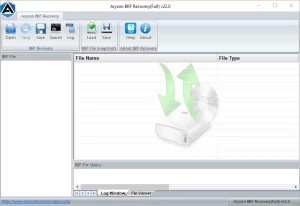
- Then, run as administrator >> load your required BKF files to repair.
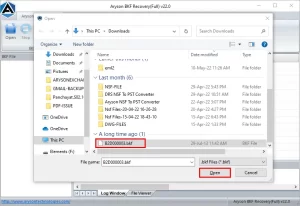
- After that, decide whether you want to scan the entire file or only a specific range.
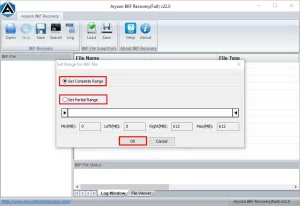
- Proceed further by clicking the OK button to start the BKF file recovery process.
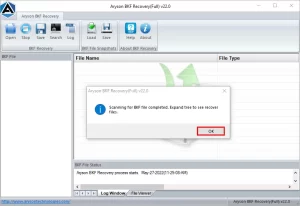
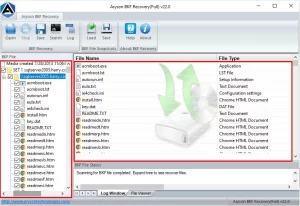
- After completing the scan process, the software will display recovered data for preview.
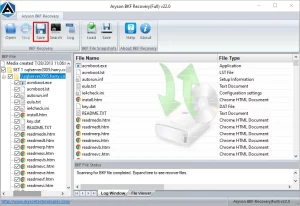
- At last, click the Save button to store the recovered BKF file content.
Conclusion
The fixes discussed above can help you diagnose and resolve the Error Code 0142 effectively. You can use the S.M.A.R.T. test to detect whether the issue is with the hard drive or not. The user may also use the Dell Diagnostics. If the drive is failing, recovering your important data becomes essential. For that, you can use the recovery solution above as it offers a quick and reliable way to restore corrupted BKF files before the disk becomes unusable.
Frequently Asked Questions:
Q.1. How do I fix Error Code 0142 on a Dell laptop or PC?
Ans- You can run the S.M.A.R.T. test to detect whether the issue is with the hard drive or use the Dell Diagnostics. If nothing works, use the automated solution to recover your Windows data.
Q.2. Is Error Code 0142 a serious problem?
Ans- Yes, Error Code 0142 is considered serious because it usually indicates a failing hard drive or critical system issue. If not addressed quickly, it can lead to data loss, system crashes, or complete drive failure. It’s important to run diagnostics and recover your data as soon as possible.
Q.3. Can software fix Error 0142, or do I need a new hard drive?
Ans- Yes, the above software can resolve the fix Code 0142 Error effortlessly.
About The Author:

Adom Smith is a DataRecoveryHelp Technology Writer. He is a technology enthusiast with over 3 years of experience in Data Recovery, IoT, Artificial Intelligence, and Robotics. He enjoys researching and sharing DIY solutions as well as tips and tricks for resolving Windows technical issues.
Realted Post


