

-
Written By Adom Smith
-
Updated on March 2nd, 2026
Fix SQL Attach Database 9003 Error: Best Solution
Summary: The SQL database becomes an integrated part of the software. Most of the tech users use SQL databases due to their simplicity and simple user interfaces. However, there is a situation where MDF and LDF files of the SQL database do not attach to its schema under the SQL database. This causes error 9003, which prevents the users from accessing the database. In this blog, we provide various methods to solve the SQL Attach Database 9003 Error. Also, we introduced the SQL Database Recovery Tool to easily attach the MDF and LDF files to its database.
Download Now Purchase Now
What Causes SQL Attach Database Error 9003?
Error 9003 occurs when SQL Server fails to attach a database. Here are some common reasons to include:
- The MDF and LDF files got corrupted or inaccessible.
- SQL Server is unable to find the location of the file due to moved or deleted files.
- The SQL Server lacks the necessary read and write permissions.
- Underlying hardware failure is causing I/O permission and performance issues.
- If you’re attempting to attach a database that is incompatible with the current version of SQL Server.
Manual Method to Fix SQL Attach Database 9003 Error
Several troubleshooting methods are available to fix SQL Error 9003. You can follow these manual steps to resolve the issue:
Check SQL Server Error Logs
The SQL Server error log is the soul of the SQL Server. It contains the root cause behind the SQL attachment database error. Many compelling reasons cause error 9003. Analyze these reasons by using the SQL Server error log to avoid any further errors occurring.
- Open the SQL Server Management Studio (SSMS) application on your system.
- After that, navigate to the Management > SQL Server Log.
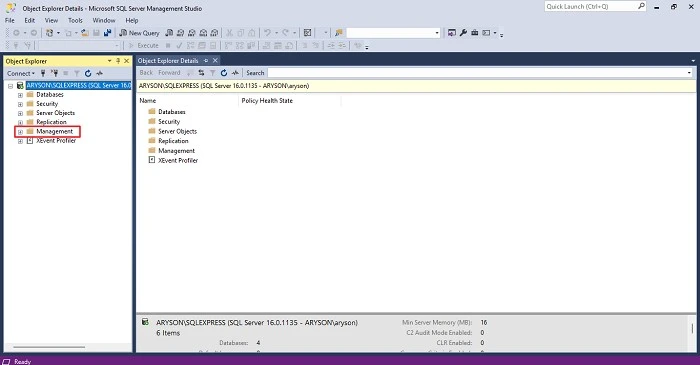
- After that, open the document/messages related to error 9003.
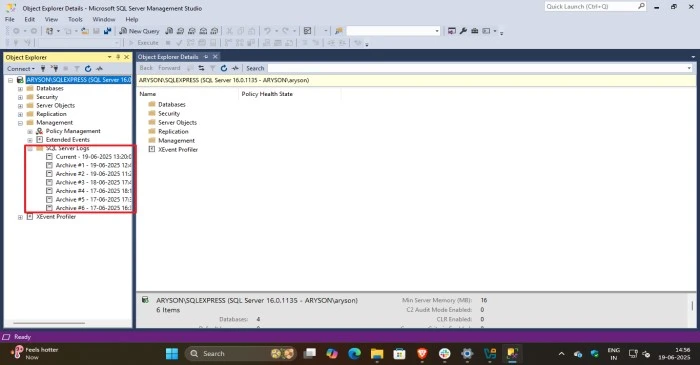
- Then, find any mismatch, corrupted, or missing log data or metadata.
Verify File Integrity and Consistency
Error 9003 is caused by a mismatch in the integrity of the log file with the MDF files. This happens due to issues like file corruption, incomplete file transfers, renaming, or relocation of files.
- Make sure that the names of the LDF file and MDF files remain unchanged.
- Their original position/location is not altered after attaching them to the SQL Server database.
Ensure Correct Permissions
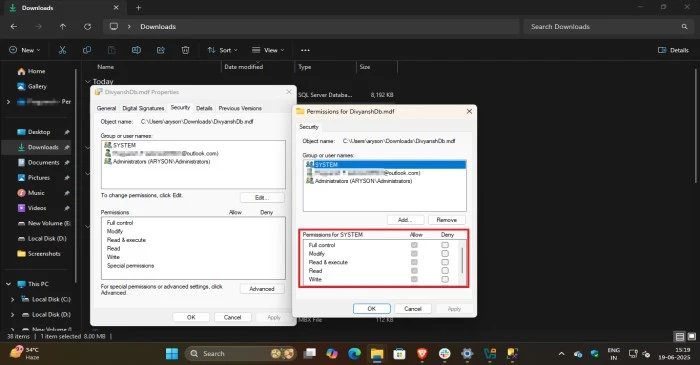
If you do not give the necessary permission to the MDF or LDF file, then they are unable to attach to the SQL Server database. Make sure you give proper access and permission to the database files.
- Open the File Explorer application by pressing the Windows + E button simultaneously.
- Next, browse and select the relevant LDF and MDF files.
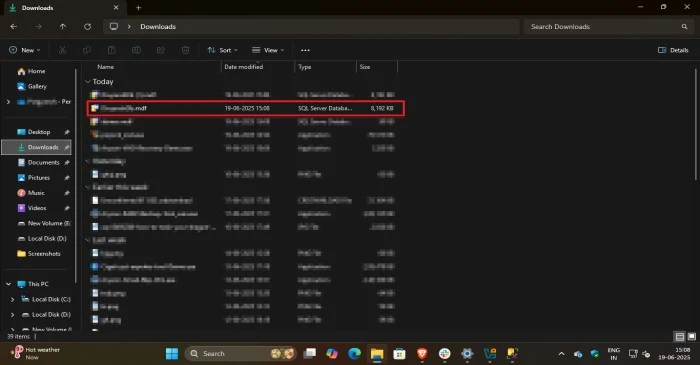
- After that, right-click on the file or folder that contains the MDF or LDF files.
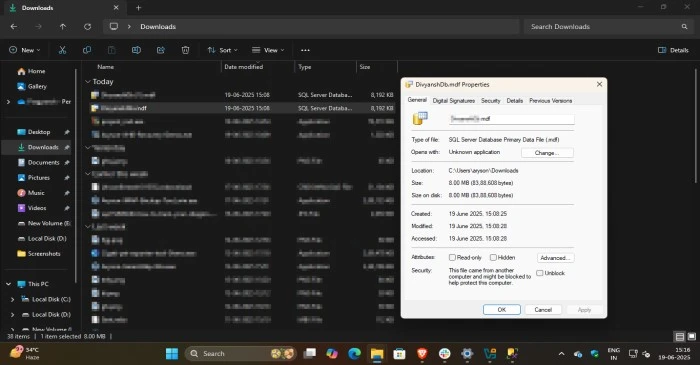
- Open the Properties option or tap Alt+E simultaneously and open the security section.
- Make sure all the admin and privileged permissions are granted to the SQL Server.
Top-Notch Tool to Resolve SQL Attach Database 9003 Error
Due to the complexity and limitations associated with the manual method, professionals always suggest using SQL Database Recovery Software. The professional tool successfully resolves your error and protects your data without any kind of limitations. Moreover, the tool also provides an option to choose the scanning and recovery mode to save you time and effort.
The effective tool not only resolves the error but is also compatible with schemas and data that provide peace of mind and easy accessibility. In the end, apart from these benefits, the tool also fixes the SQL Server error 8923 and others related to read & write permission.
Steps To Fix SQL Server Error 9003 Attach Database
- Launch the SQL Database Recovery Tool after installing it on your system.
- Browse and select the corrupted SQL database file from the local drive.
- After that, choose the Recovery Mode option as needed.
- Next, choose the specific data you wish to restore from the preview window.
- In the end, save the resultant data into a relevant storage location.
Read Also: SQL Server Error 5123.
Conclusion
In summary, this article discusses practical solutions to fix the SQL attach database 9003 error. It highlights two proven approaches: a manual method and a professional tool, followed by the key reason for the error. The manual solution is cost-free but may involve more complexity and potential limitations. In contrast, the expert-recommended tool offers a secure, efficient, and hassle-free recovery experience.
Frequently Asked Questions
Q.1 What is error code 9003 in SQL Server?
Ans. The log scan number “1-481-9’ passed to log scan in database “SQLEXPRESS” is not valid. This error may indicate data corruption or that the log file (.ldf) does not match the data file (.mdf). If this error occurred during replication, re-create the publication. Otherwise, restore from backup if the problem results in a failure during startup.
Q.2 How do I get rid of SQL error?
Ans. Use the professional SQL Database Recovery Software. The tool is equipped with the latest and most innovative algorithm that recovers your data with ease and convenience.
About The Author:

Adom Smith is a DataRecoveryHelp Technology Writer. He is a technology enthusiast with over 3 years of experience in Data Recovery, IoT, Artificial Intelligence, and Robotics. He enjoys researching and sharing DIY solutions as well as tips and tricks for resolving Windows technical issues.
Realted Post


