

-
Written By Adom Smith
-
Updated on March 2nd, 2026
How to Fix SQL Orphaned Users – Quick Solutions & Guide
Summary: Database administrators very often face the SQL orphaned users error when a database is restored or moved to a different SQL Server instance. This error takes place due to mismatched security identifiers when a database user is no longer linked to a corresponding SQL Server login. Orphaned users may result in login failures & restrict access to database objects. In this blog, you will explore different fixes & learn how to use the Aryson SQL Server Database Migration software provided. To get more insights, continue reading.
Download Now Purchase Now
Download Now Purchase Now
What Causes Orphaned Users SQL Server Error?
- You might have restored a database to a different SQL Server instance.
- Migrating databases between servers with different logins can cause this error.
- Moreover, you might have deleted an SQL Server login while the database user still exists.
- In addition, the a mismatch of Security Identifiers (SIDs) between the login and the user.
- You would have moved databases between development, test, & production environments.
Detect Orphaned Users in Azure SQL Database
In order to resolve the SQL Orphaned Users, you have to first detect the Orphaned Users in your Azure SQL Database. The Azure SQL Database and Azure Synapse Analytics don’t support the sys.server_principals view. Therefore, if you want to detect the orphaned users, first you must compare across databases.
Step 1: Get Login SIDs from the Master Database
To begin, connect to the master database and run the following command:
|
SELECT sid FROM sys.sql_logins WHERE type = ‘S’; |
This command will retrieve all your valid SQL authentication logins and their SIDs.
Step 2: Extract User SIDs from the User Database
Now, switch to the user database and run the following:
|
SELECT name, sid, principal_id FROM sys.database_principals WHERE type = ‘S’ AND name NOT IN (‘guest’, ‘INFORMATION_SCHEMA’, ‘sys’) AND authentication_type_desc = ‘INSTANCE’; |
This command will display all SQL users defined in the database.
Step 3: Comparison of Both Tables
In case any SID is present in the user database but not in the master database login list , that user is an orphaned user.
How to Fix the SQL Orphaned Users Error?
Once an orphaned user is identified, you can resolve the SQL Server Orphaned users error using the following fixes.
Fix 1: Recreate the Missing Login Using the Same SID
In the master database, recreate the login using the SID associated with the orphaned user:
|
CREATE LOGIN <login_name> WITH PASSWORD = ‘<StrongPassword>’, SID = <SID>; |
This restores the original login-to-user relationship.
Fix 2: Mapping an Orphaned User to Existing Login
- After that, verify that the required SQL Server login already exists.
- Then, map the orphaned user to the correct login by using the ALTER USER command.
- Now, if a suitable login already exists, connect to the user database and run:
|
ALTER USER <user_name> WITH LOGIN = <login_name>; |
This MySQL command will reassign the orphaned user to the selected login and resolve the Orphaned SQL Server Users.
Fix 3: Create a New Login and Associate It
- Furthermore, check whether the login for the orphaned user is missing on the server.
- Then, create a new SQL login with a secure password.
- After that, map the newly created login to the orphaned database user.
- Finally, validate the user permissions and access to the database.
Fix 4: Use the Automated Recovery Solution
The Aryson SQL Server Database Migration Software is the most efficient solution used to simplify the transfer of databases with maximum accuracy. This software enables efficient migration of SQL Server databases & tables between servers, exports data to .sql files, and supports direct conversion to MySQL database scripts. Moreover, it provides the user with smart preview options, live database migration support, & compatibility across SQL Server versions from 2000 to 2022. Also, you can securely and efficiently migrate your databases while preserving tables, keys, indexes, and constraints.
Steps to Recover Your Databases
- Firstly, install the Aryson SQL Server Database Migration software >> open it.
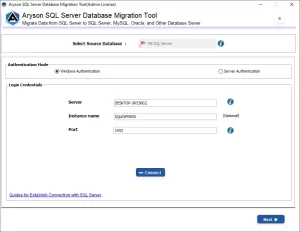
- After that, choose either the Windows Authentication or Server Authentication option.
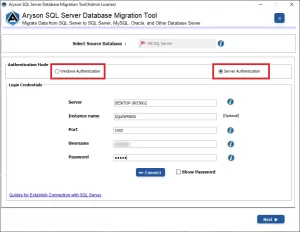
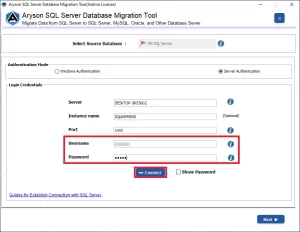
- Then, you have to enter the Username & Password >> click on the Connect button.
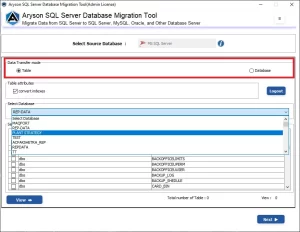
- Now, select the Data Transfer Mode, Table Attributes & other features.
- Next, pick the Destination Database >> choose MySQL or MySQL script.
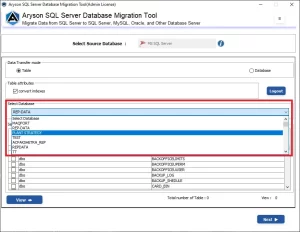
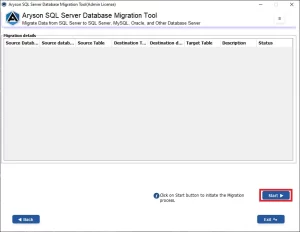
- At last, click on the Connect button >> then click on the Start button.
Also Read: Database Consistency Errors
Conclusion
In the above blog, we discussed some of the valid causes of the SQL Orphaned Users Error. Moreover, it provided the steps to resolve it. You can detect the SQL’s Orphaned Users, map an orphaned user to the existing login & create a new login. In case the issue resides in the MySQL system tables, you can use the automated solution to migrate your MySQL database. Still, if you have any queries while using the software, you can contact our tech support team for further assistance.
Frequently Asked Questions:
Q.1.How can I find orphaned users in SQL Server?
Ans- To resolve this issue, you first have to find Orphaned Users SQL Server whose SIDs do not match any existing SQL Server login, usually using system views like
| sys.database_principals and sys.server_principals. |
Q.2. What is the impact of orphaned users on SQL Server?
Ans- Orphaned users can cause login failures, access issues for applications, and permission errors, potentially disrupting database operations.
About The Author:

Adom Smith is a DataRecoveryHelp Technology Writer. He is a technology enthusiast with over 3 years of experience in Data Recovery, IoT, Artificial Intelligence, and Robotics. He enjoys researching and sharing DIY solutions as well as tips and tricks for resolving Windows technical issues.
Realted Post


