

-
Written By Adom Smith
-
Updated on March 2nd, 2026
Outlook Keeps Logging Me Out? Here’s What You Can Do
Summary: Have you ever wondered while opening Outlook only to find yourself logged out, you ask yourself, Why does Outlook keep logging Me Out. Outlook logging out randomly isn’t unusual. A few hidden settings or outdated configurations are often behind it. This technical post will tell you how to fix your Outlook by using the PST Repair Tool, which can repair the PST files and recover without any limits.
Download Now Purchase Now
Some of the reasons why Outlook Keeps Logging Me Out?
Several things could be causing this issue, depending on how and where you’re using Outlook. There are some of the most common reasons:
- Your Browser Clears Data
If you use Outlook Web, your browser might be clearing cookies when you close it—causing you to get signed out.
- Saved Login Info Is Messed Up
Outlook may be using old or duplicate login details, which can confuse the app and force a sign-in loop.
- Two-Factor Issues
If 2FA isn’t syncing right, Outlook might log you out to avoid any risks due to these security issues.
- Your PST file can be corrupted or damaged
If your PST is damaged, it can cause sync issues, which sometimes lead to automatic logouts.
How to Fix Outlook Auto Logout on PC & Mobile
You can access your data in Outlook from your PC, mobile device, or browser. But your Outlook keeps logging you out of your device; here are the methods you can try to stop Outlook from logging you out.
Method 1: Sign Out of Your Account in Word or Outlook
If you use Outlook in a browser like Chrome or Firefox. Sometimes the browser needs to refresh the history, including the accounts. This might be the solution when Outlook Keeps Asking to Sign In :
- In Word, go to File > Account and click Sign Out.
- In Outlook, open the Account tab and click Sign Out there too.
- After signing out of Outlook, navigate to and click on the Office Account tab, and click Sign In.
- If you see an error, it means another Microsoft account is still signed in.
- To fix it, go to the Account tab, click Switch Account, and sign in with the Microsoft account used for SuiteFiles.
Method 2: Delete Old Credentials from Windows
- Open Control Panel > Credential Manager.
- Click on Windows Credentials.
- Remove any saved entries that include Outlook, Microsoft, or Office.
- Reopen Outlook and log in with your current credentials.
Method 3: Update Everything to Fix the Outlook Sign-Out Problem
- Firstly, Open Outlook on your pc.
- Navigate to the File to select Office Account.
- Select the Update Options tab.
- Lastly, click on Update Now to update the Outlook.
- Select the Update Options tab.
- Lastly, click on Update Now to update the Outlook.
- Similarly, open Windows, then navigate to Settings and click on Update & Security > Check for updates.
- If there is any update, do it to fix the error.
Method 4: Easily Repair A Damaged PST File when Outlook Keeps Logging Me Out
If none of the above-mentioned techniques solves the problem, this might be the issue with your PST file. An Automatic logout issue can occur when your PST file is corrupted. Since this file holds your emails and settings, any damage to it can lead to such problems. In this case, using a reliable tool like the Aryson PST Repair Tool can help. It safely repairs or converts your PST file, helping Outlook run smoothly, and also fixes Outlook Error 0X8004011D and others. By following the steps below:
-
- Install and launch the MSG Converter Tool and click Open.
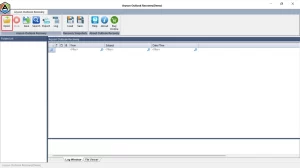
- Install and launch the MSG Converter Tool and click Open.
-
- Choose and select the File or folder that you need to repair.
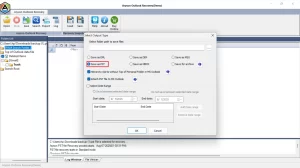
- Choose and select the File or folder that you need to repair.
-
- You can always preview the content of the file before saving it.
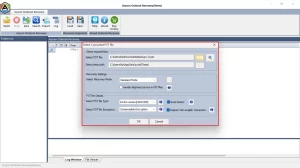
- You can always preview the content of the file before saving it.
-
- Click on Save to save the repaired files into the computer.
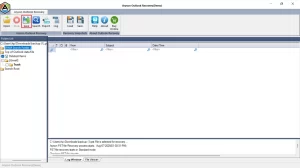
- Click on Save to save the repaired files into the computer.
-
- You can choose the format according to your needs and can apply filters to sort the unwanted data.
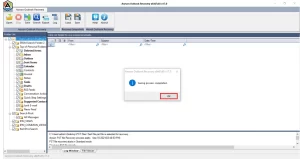
- You can choose the format according to your needs and can apply filters to sort the unwanted data.
-
- When the process is done, all the saved file will be saved in your local system.
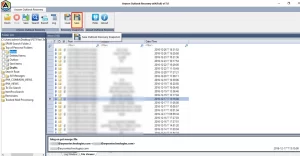
- When the process is done, all the saved file will be saved in your local system.
Also Read : Cannot open pst file of MS Outlook
Conclusion
If Outlook Keeps Logging Me Out, the problem could be due to browser settings, outdated login info, or a damaged PST file. You should always try the built-in techniques first, which are mentioned above. If those don’t help according to the situation, then repairing the Outlook data file using the Aryson PST Repair Tool is a smart option. It helps restore your PST file and keeps your Outlook running without constant sign-in prompts.
Frequently Asked Questions:
Q.1 Why does Outlook keep logging me out every time I close the browser or app?
Ans. This usually happens when your browser deletes cookies or cache on exit. It can also occur if strict security rules are set by your organization.
Q.2 How do I stop Outlook from asking me to sign in repeatedly?
Ans. Remove outdated or duplicate credentials from Windows, ensure you’re signed in with the correct Microsoft account, and keep your Outlook updated.
Q.3 Why does Outlook keep asking for my password on Windows 10/11?
Ans. This might be caused by a damaged PST file, stored login conflicts, or an outdated version of Outlook. Fixing the PST file or resetting credentials often solves the issue.
About The Author:

Adom Smith is a DataRecoveryHelp Technology Writer. He is a technology enthusiast with over 3 years of experience in Data Recovery, IoT, Artificial Intelligence, and Robotics. He enjoys researching and sharing DIY solutions as well as tips and tricks for resolving Windows technical issues.
Realted Post


