-
Written By Adom Smith
-
Updated on February 14th, 2026
How to Recover SQL Server Database from Corrupt Backup File Easily
Summary: Losing access to a SQL Server database due to a corrupt backup can result in data risk. It is very important for database administrators and IT teams to recover SQL Server Database from Corrupt Backup File. Therefore, an effective recovery process helps to minimize service interruptions. With the help of a reliable solution like the DataRecovery Help MS SQL Recovery Tool, users can guarantee a safe and complete restoration. Download Now Purchase Now
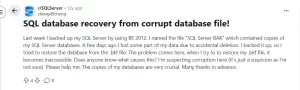
Causes to Restore Corrupt SQL Backup File Database
Users need to first understand the common causes that help them to prevent damage and to plan proper recovery:
- During backup creation, there may be an unexpected server shutdown.
- Physical storage damage, such as bad sectors or disk failure, may occur.
- Moreover, there might be virus attacks that affect the backup file integrity.
- Users’ backup process gets interrupted due to network or system issues.
- Also, it can be improper file transfer or incomplete copying of the backup file.
Various Approaches to Recover SQL Server Database from Corrupt Backup File
When a SQL backup file becomes inaccessible, then choose the appropriate recovery approach, which is important to protect data. Below, we have discussed the multiple ways.
Manual Techniques to Recover Database from a Corrupt .bak File
When your SQL backup file becomes corrupted, you can perform recovery with the help of built-in SQL Server methods, which are discussed below.
Way 01: Users can use an Alternative Backup Copy
If the existing backup file is corrupted, the first step is to locate another working backup.
- Firstly, you need to verify backup integrity: Before performing a restore, users need to check whether the backup file is readable by the following:
|
RESTORE VERIFYONLY FROM DISK = ‘C:\Path\To\Your\BackupFile.bak’; |
This command verifies the backup without restoring the database.
- After that, search for a healthy backup: If the verification fails, then look for another full or transaction log backup that completes the integrity check successfully.
- At the end, restore using the valid backup: Once a reliable backup is identified, proceed with the restoration through SQL Server Management Studio or by using T-SQL commands.
Way 02: Repair the Original Database with DBCC CHECKDB
If no clean backup is available but the MDF and LDF files still exist, you can attempt to restore corrupted BAK File of SQL Server.
- Firstly, activate the EMERGENCY Mode
|
ALTER DATABASE YourDatabaseName SET EMERGENCY; |
- After that, switch to SINGLE_USER Mode
|
ALTER DATABASE YourDatabaseName SET SINGLE_USER WITH ROLLBACK IMMEDIATE; |
- Execute DBCC CHECKDB with Repair Option
|
DBCC CHECKDB (YourDatabaseName, REPAIR_ALLOW_DATA_LOSS) WITH ALL_ERRORMSGS, NO_INFOMSGS; |
This process attempts to correct corruption and may remove damaged pages if necessary.
- Then, return to MULTI_USER Mode
|
ALTER DATABASE YourDatabaseName SET MULTI_USER; |
- At the end, users need to recheck database integrity.
|
DBCC CHECKDB (‘YourDatabaseName’); |
Running this final command confirms whether the database is free from further corruption.
Limitations of the Manual Approach
Manual methods are helpful for certain situations, but they come with several drawbacks and risks.
- They may lead to partial or complete data loss during repair operations.
- It can be time-consuming, especially for heavily damaged databases.
- Manual verification does not always guarantee successful restoration.
- Moreover, if no healthy backup exists, recovery options become very limited.
- Also, there is a high risk of errors that may worsen database corruption.
Professional Solution to Recover SQL Server Database from Corrupt Backup File
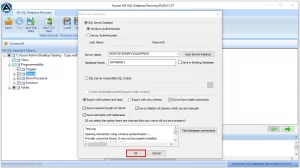
MS SQL Recovery Tool is a reliable utility to repair and restore data from severely damaged SQL backup files with efficiency. When the manual techniques fail or result in loss of data, then this automated solution is helpful. It simplifies the complex recovery tasks and reduces downtime, which provides a smooth restore process for administrators and organizations. Users can try the trial version to explore the key features. Also, with the help of the same software, you can perform SQL Server Backup and Restore Database.
Steps to Repair Corrupt SQL Backup File:
- First, you have to install and launch the SQL Database Recovery Software.

- After that, browse to add a corrupt SQL database file.
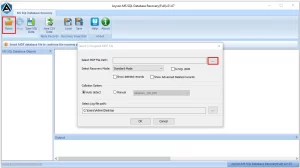
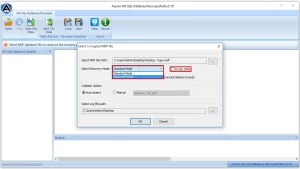
- Then, to scan your database, you have to set the appropriate recovery mode.
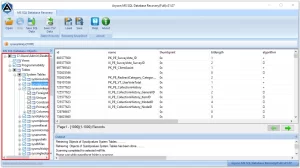
- Next, preview the recovered tables and database objects.
- Lastly, save the recovered data to a live SQL Server or as SQL script.
Final Remark
In this blog, we have outlined the different methods to recover SQL Server database from corrupt backup file. While built-in techniques are helpful for limited situations, they involve technical complexity. The automated technique helps to protect the database integrity and reduce downtime. Therefore, choose the appropriate approach based on your database condition and perform a secure recovery process.
Frequently Asked Question
Q.1. Is it possible to repair a damaged BAK file without backup software?
Ans: Yes, you can try built-in SQL Server commands, but they are limited and may cause data loss. The MS SQL Recovery Tool provides a safer recovery option.
Q.2. How do I fix the “The backup set is corrupted” error in SQL Server?
Ans: This error usually appears when the backup file is incomplete or damaged. Verify the backup or restore from another valid copy. If unavailable, use the MS SQL Recovery Tool to repair and extract data.
Q.3. How long does it take to restore a corrupted BAK file?
Ans: Recovery time depends on file size and corruption level. The MS SQL Recovery Tool speeds up the process compared to manual methods.
About The Author:

Adom Smith is a DataRecoveryHelp Technology Writer. He is a technology enthusiast with over 3 years of experience in Data Recovery, IoT, Artificial Intelligence, and Robotics. He enjoys researching and sharing DIY solutions as well as tips and tricks for resolving Windows technical issues.
Realted Post