-
Written By Adom Smith
-
Updated on March 2nd, 2026
Restore Corrupt SQL Backup File Database Without Data Loss

Summary: Your entire business can stop within a few seconds due to a corrupt SQL backup file. It becomes difficult to access critical data, and your applications fail to connect. When you restore your corrupt SQL backup file, it helps to save your time, reduce downtime, and avoid costly database rebuilds. Recovery is important if your backup is damaged due to server crashes, improper shutdowns, or storage issues. In this guide, you will learn safe and effective ways, along with Aryson SQL Backup Recovery. The approaches given helps to restore corrupt SQL backup file database while keeping your data intact and your SQL Server running smoothly.
Download Now Purchase Now
Download Now Purchase Now
Understanding SQL Server Database File Formats
Now, we will discuss the different types of SQL Server files that help to store and recover data:
- .mdf (Primary Data File): This is the main SQL Server data file. It consists of tables, views, indexes, and other core database objects.
- .ndf (Secondary Data File): These are optional data files that store additional data when the database grows large.
- .ldf (Transaction Log File): It helps to record all the transactions and changes made to the database. It supports database recovery and rollback.
- .bak (SQL Backup File): This is a backup file created to protect SQL databases from data loss. It helps to restore databases after corruption or failure.
Common Causes to Repair Corrupt SQL .bak File in SQL Server
Below are some of the common causes that users should know that affect the integrity of their SQL backup files and lead to corruption issues:
- When the system shuts down unexpectedly, the backup process may be interrupted.
- Moreover, hardware or storage issues can damage the backup file structure.
- Also, virus or malware attacks can modify or corrupt SQL backup files.
- Additionally, network or server interruptions can lead to incomplete backups.
- When there are file system errors, it can affect the readability of SQL backup files.
How to Repair Corrupt SQL Backup File Manually?
Now we will discuss some of the easy manual approaches that can help to restore a corrupt SQL backup file. The given methods are helpful for minorly corrupted files.
01. Using the DBCC CHECKDB Command
This approach is helpful to detect and fix the minor corruption issues and recover SQL Database from a corrupt. BAK File:
-
- First, open SQL Server Management Studio (SSMS) on your system.
- Then, you have to connect to the required SQL Server instance.
- You have to make sure that the database is in single-user mode.
- After that, open a New Query in your window.
- Now, run the given DBCC CHECKDB command to check database corruption.
- If errors are found, then you have to run the repair command as given below:
- After the repair, switch the database back to multi-user mode.
- Now verify whether the database is accessible, and the data is available.
DBCC CHECKDB (‘Database_Name’); DBCC CHECKDB (‘Database_Name’, REPAIR_ALLOW_DATA_LOSS); Note: However, this method may cause data loss and is recommended only when no valid backup is available.
Drawbacks of the Manual Approach:
- While repairing the corruption, there are chances of data loss.
- This method works only for minor corruption.
- Users require technical knowledge to run SQL commands correctly.
- It does not repair a corrupt SQL backup (.bak) file directly.
- For large databases, this process can be time-consuming.
Advanced Tool to Restore Corrupt SQL Backup File Database
Aryson SQL Backup Recovery is reliable software that helps to repair and recover corrupt or damaged SQL Server backup files (.bak). This utility helps in the recovery of tables, procedures, and much more from .bkf files. It also supports multiple corruption levels and SQL Server versions. Moreover, you can also fix corrupted BKF files and more with such software.
Simple Steps to Repair Corrupt SQL .bak file in SQL Server:
- To start, first download and launch the Aryson SQL Backup Recovery Tool.
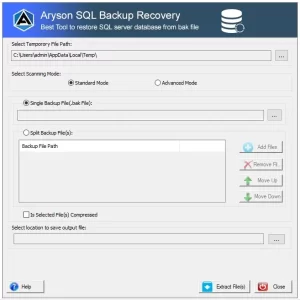
- Now, you can either choose the Split or Single .bak files.
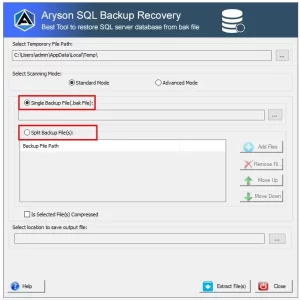
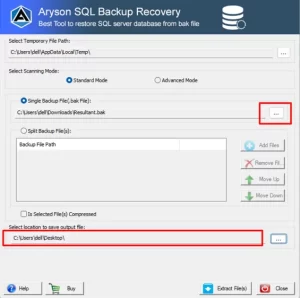
- Then, choose your .bak files to repair and extract the data >> Location
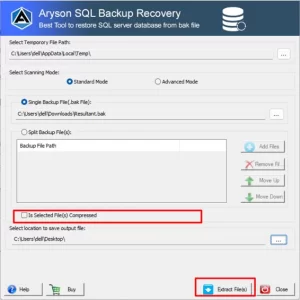
- After that, verify that your file is compressed >> Extract Files.
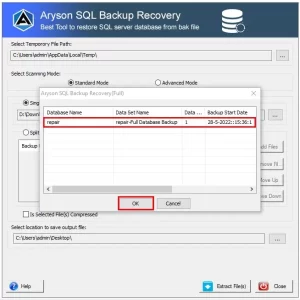
- Now, select the desired .bak file >> Ok.
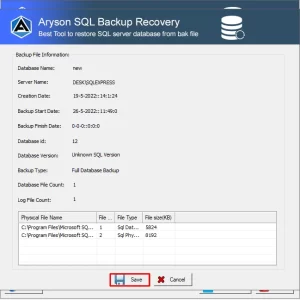
- At last, press the Save button to extract the MDF and LDF files.
Conclusion
In this blog, we outline that the right method can easily restore corrupt SQL backup file database. The manual approach, like DBCC and CHECKDB, can be helpful in minor cases, and the recommended automated approach provides complete safety and data integrity. Aryson SQL Backup Recovery is a secure and reliable utility to restore corrupted SQL server database from BAK files. You can safeguard your important SQL Server data by selecting the right approach so that you maintain smooth business operations.
Frequently Asked Question
Q.1 How can I restore a corrupt SQL backup file database?Ans: You can restore a corrupt SQL backup file database either manually using SQL Server tools like DBCC CHECKDB for minor corruption, but for a more reliable solution, use Aryson SQL Backup Recovery, which safely repairs and recovers your backup files without data loss.
Q.2. Is it possible to restore a corrupt SQL backup file without data loss?Ans: Aryson SQL Backup Recovery can be used so that the database is restored fully without losing any critical data. Now, follow the given steps :
1. Install and launch the Aryson SQL Backup Recovery Tool.
2. Choose either Split or Single .bak files.
3. Select the corrupt .bak files you want to repair.
4. Verify the files and choose Extract to recover data.
5. Select the desired .bak file and click OK.
6. Press Save to extract the MDF and LDF files.Q.3. What is the best way to restore a corrupt SQL backup file database quickly?Ans: The fastest and most effective way is to use Aryson SQL Backup Recovery. It scans the backup file, repairs corruption, and restores all database objects efficiently.
About The Author:
Adom Smith is a DataRecoveryHelp Technology Writer. He is a technology enthusiast with over 3 years of experience in Data Recovery, IoT, Artificial Intelligence, and Robotics. He enjoys researching and sharing DIY solutions as well as tips and tricks for resolving Windows technical issues.
Realted Post